On-Page SEO: Ultimate Guide to Amazing Results in 2025
Discover how to maximize your website's potential with our On-Page SEO ultimate guide. Learn proven strategies for 2025 and avoid common pitfalls. Enhance your content, boost rankings, and drive more organic traffic with actionable tips and expert insights.
On-Page SEO is the practice of optimizing individual web pages to rank higher and earn more relevant traffic in search engines. It’s a fundamental aspect of any successful SEO strategy. When we talk about On-Page SEO, we’re referring to all the actions you take within your website to improve your search engine rankings, such as optimizing content, title tags, and meta descriptions.
What is On-Page SEO and Why Does It Matter?
Defining On-Page SEO
On-Page SEO encompasses all the optimization techniques you can implement directly on your website to enhance its search engine rankings. In our experience, the best results come from a holistic approach that considers both user experience and search engine requirements. It’s not just about stuffing keywords; it’s about crafting a website that is both informative and easily navigable for users, while also providing clear signals to search engines about the content’s relevance and value.
The Importance of On-Page SEO for Ranking
Proper On-Page SEO makes it easier for search engines to understand your content and its relevance to specific search queries. This leads to higher rankings, increased visibility, and more organic traffic. Think of it like this: you’re providing search engines with a clear roadmap to your content, helping them understand exactly what your page is about and who it’s intended for. When our team in Dubai tackles this issue, they often find that even small improvements in On-Page SEO can lead to significant gains in organic traffic. Neglecting On-Page SEO means leaving potential rankings on the table, allowing competitors to outrank you even if their content isn’t superior.
How On-Page SEO Differs from Off-Page SEO
On-Page SEO is about optimizing elements within your website, such as content, title tags, and meta descriptions, while Off-Page SEO involves activities outside your website, such as link building and social media marketing. Both are crucial for a comprehensive SEO strategy. On-Page SEO is the foundation, ensuring your website is properly structured and optimized for search engines. Off-Page SEO then builds upon this foundation by increasing your website’s authority and reputation through external signals. Without a strong On-Page SEO strategy, your Off-Page efforts may not be as effective.
Keyword Research: The Foundation of On-Page SEO
Identifying Target Keywords
Begin by identifying the keywords your target audience is using to search for products, services, or information related to your business. Use keyword research tools to find relevant and high-volume keywords. It’s vital to understand the intent behind those keywords – are users looking to buy, learn, or find something specific? Targeting the right keywords ensures that your content reaches the right audience and addresses their specific needs. A client once asked us about this… We showed them how focusing on intent-driven keywords led to a measurable lift in their conversion rates.
Using Keyword Research Tools
Tools like Google Keyword Planner, SEMrush, Ahrefs, and Moz Keyword Explorer can help you discover relevant keywords, analyze their search volume, and assess their competition. These tools offer a wealth of data, including keyword suggestions, search volume trends, and competitive analysis. Understanding how your target keywords are performing and who your competitors are targeting is crucial for developing an effective content strategy. We often use these tools to identify untapped opportunities and create content that fills gaps in the market.
Long-Tail Keywords and Their Significance
Long-tail keywords are longer, more specific phrases that often have lower search volume but higher conversion rates. Targeting these keywords can attract a more qualified audience. For example, instead of targeting “coffee,” you might target “best organic fair-trade coffee beans online.” While the search volume for the latter may be lower, the users searching for it are likely further along in the buying process. Targeting long-tail keywords allows you to cater to niche audiences and answer specific questions, which can lead to higher engagement and conversions.
“The key to successful keyword research is understanding the intent behind the search. Are people looking to buy something, find information, or solve a problem? Tailor your content to match their intent, and you’ll see much better results.” – Brian Dean, Backlinko
Optimizing Title Tags for Maximum Impact
What are Title Tags?
Title tags are HTML elements that specify the title of a web page. They are displayed on search engine results pages (SERPs) and are crucial for attracting clicks. Think of your title tag as the headline of your web page in search results. It’s often the first thing users see, and it plays a significant role in determining whether they click on your website or not. Therefore, crafting compelling and relevant title tags is essential for driving organic traffic.
Best Practices for Writing Effective Title Tags
Keep title tags concise (under 60 characters), include your primary keyword, and make them compelling and relevant to the page’s content. In our experience, a well-optimized title tag should accurately reflect the page’s content while also enticing users to click. Using power words (e.g., “Best,” “Ultimate,” “Amazing”) can help grab attention, but avoid clickbait or misleading titles. The goal is to provide a clear and accurate representation of what users can expect to find on the page.
Common Mistakes to Avoid in Title Tags
Avoid keyword stuffing, using generic titles, or creating duplicate title tags across multiple pages. Each title tag should be unique and accurately reflect the page’s content. Keyword stuffing can actually hurt your SEO, as search engines may view it as manipulative. Generic titles (e.g., “Home,” “About Us”) provide little value to users and search engines. Duplicate title tags can confuse search engines and make it difficult for them to determine which page is the most relevant for a given search query.
Crafting Compelling Meta Descriptions
What are Meta Descriptions?
Meta descriptions are HTML attributes that provide a brief summary of a web page’s content. They are displayed on SERPs below the title tag. While meta descriptions don’t directly impact rankings, they play a crucial role in influencing click-through rates (CTR). A well-written meta description can entice users to click on your website in the search results, even if it’s not the top-ranked result.
Writing Meta Descriptions That Drive Clicks
Write meta descriptions that are engaging, informative, and include a clear call to action. Keep them under 155 characters and include your primary keyword. Think of your meta description as a mini-advertisement for your web page. Highlight the key benefits of visiting your page and encourage users to take action (e.g., “Learn more,” “Get a free quote,” “Shop now”). Including your primary keyword helps reinforce the relevance of your page to the search query.
The Relationship Between Meta Descriptions and Click-Through Rate (CTR)
A well-written meta description can significantly improve your click-through rate (CTR) by enticing users to click on your website in the search results. A higher CTR can, in turn, improve your rankings, as search engines interpret it as a sign that your page is relevant and valuable to users. Therefore, investing time in crafting compelling meta descriptions is a worthwhile content optimization effort. We’ve seen firsthand how optimized meta descriptions can lead to a significant boost in organic traffic.
Header Tags (H1-H6): Structuring Your Content
The Importance of Header Tags
Header tags (H1-H6) are used to structure your content and create a hierarchy of information. H1 tags are typically used for the main title, while H2-H6 tags are used for subheadings. They’re like the outline of your content, providing a clear roadmap for both readers and search engines. Proper use of header tags improves readability, accessibility, and SEO. A well-structured page is easier to scan and understand, leading to a better user experience.
Best Practices for Using Header Tags
Use header tags to break up your content into logical sections, making it easier for readers and search engines to understand the main topics and subtopics. Start with an H1 tag for the main title of your page, then use H2 tags for major sections, H3 tags for subsections, and so on. Ensure that your header tags accurately reflect the content of the corresponding sections. This helps search engines understand the context and relevance of your content.
How Header Tags Impact SEO
Properly using header tags can improve your website’s readability and accessibility, which can indirectly boost your SEO performance. Search engines use header tags to understand the context of your content. By using header tags effectively, you’re making it easier for search engines to crawl and index your pages, which can lead to higher rankings. Moreover, well-structured content is more engaging for users, leading to longer time on page and lower bounce rates, which are also positive ranking signals.
Image Optimization for Improved SEO and User Experience
Why Optimize Images?
Optimizing images can improve your website’s loading speed, reduce bandwidth consumption, and enhance user experience. It also provides opportunities to include relevant keywords in alt text. Large, unoptimized images can significantly slow down your website, leading to a poor user experience and lower rankings. Optimized images, on the other hand, load quickly, conserve bandwidth, and make your website more enjoyable to use.
Image File Formats: Choosing the Right One
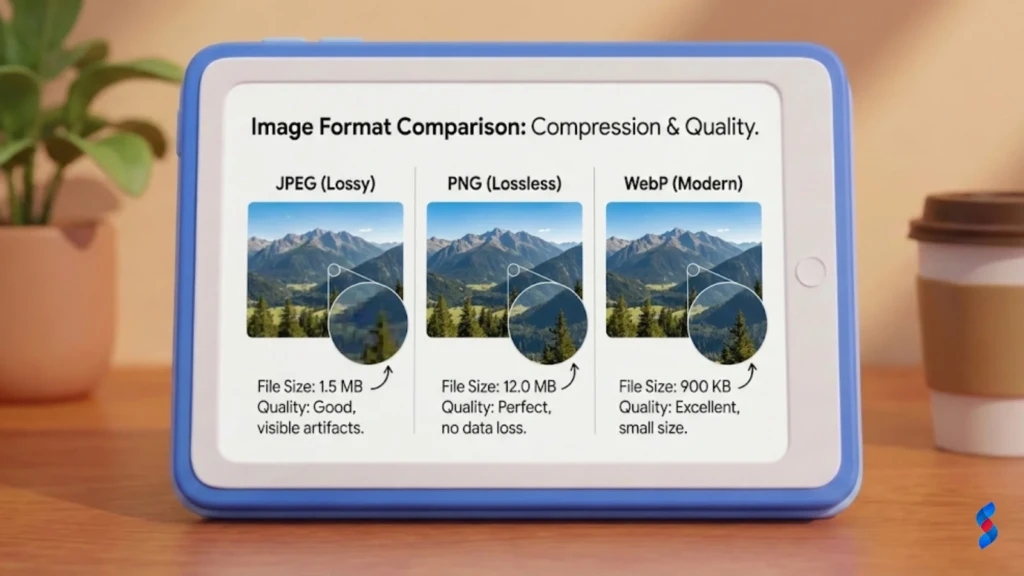
Use appropriate image file formats (e.g., JPEG for photos, PNG for graphics) to balance image quality and file size. Consider using WebP format for improved compression and quality. JPEGs are best for photographs because they offer good compression while maintaining reasonable image quality. PNGs are better for graphics with sharp lines and text because they support lossless compression. WebP is a modern image format that offers superior compression and quality compared to JPEGs and PNGs.
Alt Text and Its Role in SEO
Alt text (alternative text) is used to describe images to search engines and visually impaired users. Include relevant keywords in your alt text to improve your website’s SEO. Alt text provides context to search engines about the content of your images. It also helps visually impaired users understand the images on your page. When writing alt text, be descriptive and concise, and include relevant keywords where appropriate.
Internal Linking: Connecting Your Content
What is Internal Linking?
Internal linking involves linking from one page of your website to another. It helps users navigate your website and helps search engines discover and understand your content. It’s a powerful content strategy tool that can improve your website’s SEO and user experience. By creating a network of interconnected pages, you’re making it easier for users to find the information they need and for search engines to crawl and index your website.
Strategies for Effective Internal Linking
Link to relevant pages within your content, using descriptive anchor text. Create a network of interconnected pages to improve your website’s overall SEO. When linking internally, choose anchor text that accurately describes the content of the destination page. Avoid using generic anchor text (e.g., “click here”). Link to pages that are relevant to the current topic, providing users with additional information and resources.
Benefits of Internal Linking for SEO and User Experience
Internal linking improves user engagement, reduces bounce rate, and distributes link juice throughout your website, which can boost your rankings. By providing users with relevant internal links, you’re encouraging them to explore your website further, which can increase engagement and reduce bounce rate. Internal linking also helps distribute “link juice” (SEO authority) throughout your website, which can improve the rankings of your linked pages.
Benefit
Description
Improved User Engagement
Internal links encourage users to explore more of your website.
Reduced Bounce Rate
By providing relevant links, you keep users on your site longer.
Distribution of Link Juice
Internal links pass SEO authority to linked pages.
Website Speed and Mobile-Friendliness: Essential On-Page Factors
The Impact of Website Speed on SEO
Website speed is a crucial ranking factor. Slow-loading websites can lead to higher bounce rates and lower rankings. In today’s fast-paced digital world, users expect websites to load quickly. If your website is slow, users are likely to abandon it and go to a competitor’s site. Search engines also take website speed into account when ranking pages. A slow-loading website can negatively impact your SEO performance.
Optimizing Your Website for Mobile Devices
With the majority of web traffic coming from mobile devices, it’s essential to ensure your website is mobile-friendly. Use a responsive design and optimize for mobile devices. Mobile-friendliness is no longer optional; it’s a necessity. A responsive design adapts your website to different screen sizes and devices, providing a consistent user experience across all platforms. Optimizing for mobile devices also involves ensuring that your website loads quickly and is easy to navigate on smaller screens.
Tools for Measuring and Improving Website Speed
Use tools like Google PageSpeed Insights, GTmetrix, and WebPageTest to measure your website’s speed and identify areas for improvement. These tools provide valuable insights into your website’s performance and offer recommendations for optimizing your website speed. Common optimizations include compressing images, minifying CSS and JavaScript files, and leveraging browser caching. Addressing these issues can significantly improve your website’s loading speed.
Schema Markup: Helping Search Engines Understand Your Content
What is Schema Markup?
Schema markup is code that you can add to your website to provide search engines with more information about your content. It helps them understand the context and meaning of your pages. Think of schema markup as a translator that helps search engines understand the content of your website. By adding schema markup to your pages, you’re providing search engines with structured data that they can use to display rich snippets in search results.
Types of Schema Markup and Their Applications
There are various types of schema markup, including schema for articles, products, events, and reviews. Choose the appropriate schema markup for your content to enhance its visibility in search results. For example, if you’re writing a blog post, you can use the Article schema to provide search engines with information about the author, publication date, and main topic. If you’re selling products, you can use the Product schema to display product details, prices, and availability in search results.
Implementing Schema Markup for Better SEO
Use Google’s Structured Data Markup Helper to generate schema markup code and add it to your website. Test your schema markup using Google’s Rich Results Test tool. Google’s Structured Data Markup Helper is a user-friendly tool that allows you to generate schema markup code without having to write it manually. Simply select the type of content you’re marking up, highlight the relevant elements on your page, and the tool will generate the code for you. Once you’ve added the schema markup to your website, use Google’s Rich Results Test tool to ensure that it’s implemented correctly.
[IMAGE: A screenshot of Google’s Rich Results Test tool showing a page with valid schema markup.]
Common Misconceptions About On-Page SEO
Myth: Keyword Stuffing is Still Effective
Keyword stuffing (overusing keywords) can actually harm your SEO. Focus on creating high-quality, natural-sounding content that is relevant to your target audience. In the early days of SEO, keyword stuffing was a common practice. However, search engines have become much more sophisticated and can now detect keyword stuffing easily. Instead of focusing on keyword density, focus on creating content that is informative, engaging, and relevant to your target audience.
Myth: Meta Descriptions Don’t Matter
While meta descriptions may not directly impact rankings, they are crucial for improving click-through rates (CTR). A compelling meta description can entice users to click on your website in the search results. Although meta descriptions don’t directly affect rankings, they play a vital role in influencing user behavior. A well-written meta description can convince users to click on your website, even if it’s not the top-ranked result. A higher CTR can, in turn, improve your rankings.
Myth: Only the H1 Tag Matters
While the H1 tag is important, using a proper hierarchy of H1-H6 tags is essential for structuring your content and making it easier for search engines to understand the context of your page. The H1 tag is typically used for the main title of your page, and it’s important to include your primary keyword in the H1 tag. However, using a proper hierarchy of H1-H6 tags is equally important for structuring your content and making it easier for search engines to understand the context of your page.
Measuring and Analyzing Your On-Page SEO Efforts
Key Metrics to Track
Track key metrics such as organic traffic, keyword rankings, click-through rates (CTR), bounce rate, and time on page to measure the effectiveness of your On-Page SEO efforts. These metrics provide valuable insights into how your website is performing in search results and how users are interacting with your content. By tracking these metrics, you can identify areas for improvement and optimize your On-Page SEO strategy accordingly.
Using Google Analytics and Google Search Console
Use Google Analytics to track your website’s traffic and user behavior, and use Google Search Console to monitor your website’s search performance and identify any technical issues. Google Analytics provides detailed information about your website’s traffic, including the sources of your traffic, the pages users are visiting, and how long they are spending on your site. Google Search Console provides insights into your website’s search performance, including your keyword rankings, click-through rates, and any technical issues that may be affecting your SEO.
Adjusting Your Strategy Based on Data
Regularly analyze your On-Page SEO data and make adjustments to your strategy as needed. This will help you stay ahead of the competition and achieve your SEO goals. Content optimization is an ongoing process, and it’s important to regularly analyze your data and make adjustments to your strategy as needed. By staying informed about the latest SEO trends and algorithm updates, you can ensure that your website remains competitive in search results.
Conclusion
Understanding and implementing On-Page SEO techniques is crucial for achieving higher rankings, increased visibility, and more organic traffic. By optimizing your website’s title tags, meta descriptions, header tags, images, and content, you can make it easier for search engines to understand your content and its relevance to specific search queries. Remember to focus on providing a positive user experience, as this is a key ranking factor. By continuously monitoring your website’s performance and making adjustments to your On-Page SEO strategy, you can stay ahead of the competition and achieve your SEO goals. We at SkySol Media are committed to providing our clients with the best possible SEO solutions. We’ve guided numerous businesses to top rankings, and we’re confident we can do the same for you.
Q: What is the most important factor in On-Page SEO?
A: While there are many important factors, creating high-quality, relevant content that satisfies user intent is paramount. Search engines prioritize websites that provide valuable and engaging content to their users.
Q: How often should I update my On-Page SEO?
A: On-Page SEO is an ongoing process. Regularly review and update your content, title tags, meta descriptions, and other elements to ensure they are optimized for the latest search engine algorithms and user trends.
Q: Can On-Page SEO guarantee a #1 ranking?
A: No, On-Page SEO alone cannot guarantee a #1 ranking. While it’s a crucial factor, Off-Page SEO, keyword research, competition, and other variables also play a significant role. However, strong On-Page SEO significantly improves your chances of ranking higher.
Q: Is mobile-friendliness really that important for On-Page SEO?
A: Absolutely. With the majority of web traffic coming from mobile devices, search engines prioritize mobile-friendly websites. If your website is not optimized for mobile, you are likely missing out on a significant amount of organic traffic.
Q: How does Website Speed affect On-Page SEO?
A: Website Speed is a critical On-Page SEO factor. Slow-loading websites lead to higher bounce rates and lower rankings because users expect fast experiences. Search engines also favor faster sites.
Is your website struggling to rank? This checklist reveals crucial on-page SEO elements often overlooked. Improve your website's search engine visibility and drive more organic traffic with our expert tips. Dominate SERPs now!
Is your website hidden from search engines? This comprehensive on-page SEO checklist ensures your site is optimized for top rankings in 2025. Follow our expert tips to boost visibility and drive organic traffic.
Is your website's on-page SEO up to par? Discover the critical, often-overlooked elements that can significantly boost your search engine rankings in 2025. Optimize your content today!
Discover how to optimize your website effectively with our 2025 on-page SEO guide. Learn techniques to avoid common mistakes and boost your search engine rankings. Improve your website's visibility today!
Unlock the secrets to on-page SEO success! Discover 5 essential fixes to boost your website's visibility and climb to the top of search engine results in 2025. Get ready to optimize and dominate!
Discover how to perform a comprehensive on-page SEO audit. Uncover hidden issues, optimize your content, and boost your website's visibility. Follow our expert guide for improved search engine rankings and organic traffic.