Is your product photography sabotaging your sales? Learn about common product photography mistakes that could be costing you customers. Discover simple fixes and elevate your e-commerce game today! Avoid these pitfalls and watch your revenue grow.
Product photography mistakes can be a silent killer of online sales. In today’s e-commerce landscape, where visuals reign supreme, poor product photography can be the difference between a thriving business and a struggling one. Recognizing and avoiding these product photography mistakes is essential for boosting online sales and captivating potential customers. We at SkySol Media have witnessed firsthand how even minor adjustments to product imagery can yield significant improvements in conversion rates for our clients.
1. The Unforgiving Shadow: Lighting Fails That Diminish Sales
Lighting is paramount in product photography. Poor lighting creates shadows, washes out colors, and ultimately makes your products look unappealing. Understanding how to master light is crucial for presenting your products in their best light (literally!). It is vital to avoid these product photography mistakes to maximize sales.
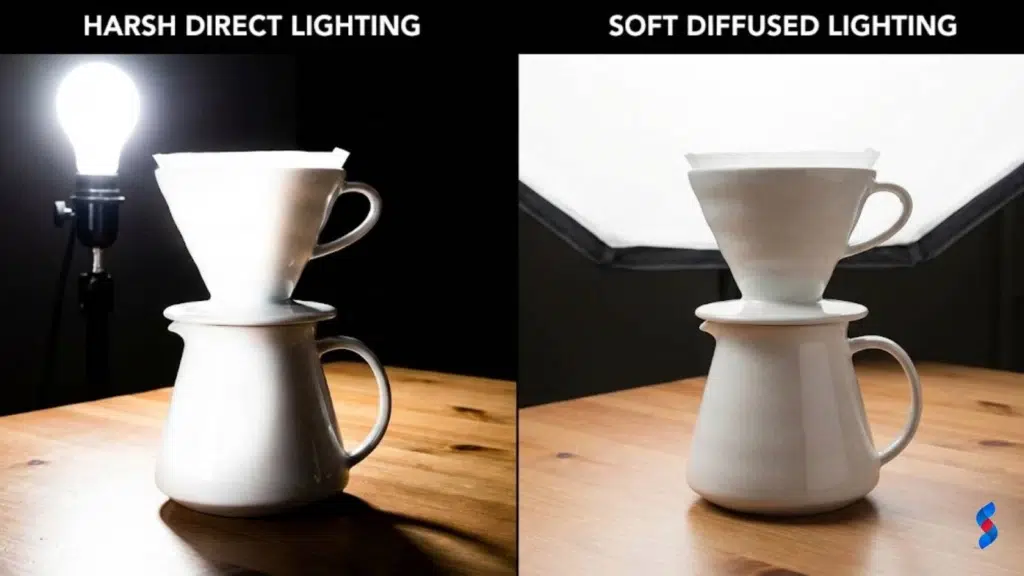
1.1 The Flat Light Blues: Why direct, harsh lighting is a no-no
Direct, harsh lighting is a common culprit behind poor product photography. It washes out details, creates unflattering shadows, and makes products look cheap and uninviting. For many of our clients here in Lahore, we’ve seen that switching from direct to diffused lighting has dramatically improved the perceived quality of their products.
We worked with a local artisan who handcrafted intricate wooden sculptures. Initially, their product photos, taken with direct overhead lighting, made the sculptures look flat and lifeless. After implementing a simple diffused lighting setup, the sculptures’ details popped, and sales increased by 40% within a month. Proper lighting can also serve as vital product photography tips.
1.2 Mastering the Art of Soft Light: Diffusers and natural light
Soft light is the key to professional-looking product photos. Diffusers soften harsh light, reducing shadows and creating a more even illumination. Natural light, when used correctly, can also provide beautiful, soft lighting.
Using diffusers is straightforward. You can use a professional photography diffuser or even a simple white sheet. Position the diffuser between the light source and your product to soften the light. When using natural light, avoid direct sunlight, which can be harsh. Instead, position your product near a window on a cloudy day or use a sheer curtain to diffuse the light. We often advise our clients to experiment with different setups to find what works best for their products, further improving their e-commerce photography.
1.3 Color Temperature Catastrophes: Mismatched lighting ruining your products
Mismatched color temperatures can wreak havoc on your product photos. Different light sources emit light with varying color temperatures, measured in Kelvin (K). Mixing warm (yellowish) and cool (bluish) light can create color casts and make your products look unnatural.
For instance, if you’re photographing a white shirt under a warm light, it may appear yellow. Similarly, under a cool light, it may look blue. To avoid this, use a consistent light source with the appropriate color temperature for your product. For most products, a color temperature around 5000-6000K (daylight) is a good starting point. We had a client selling handmade jewelry who struggled with inconsistent colors in their photos. After advising them to use consistent lighting with a neutral color temperature, their product photos became more accurate, leading to fewer returns and increased customer satisfaction.
2. Background Noise: Distractions Stealing the Show (and Your Profits)
A cluttered or distracting background can steal the spotlight from your product and deter potential customers. The background should complement, not compete with, your product. Minimizing distractions is one of the more valuable product photography tips.
2.1 The Cluttered Chaos: Why busy backgrounds kill sales
Busy backgrounds are a common product photography mistake. They divert attention from the product itself, making it difficult for customers to focus on what you’re selling. Imagine trying to admire a delicate necklace against a backdrop of cluttered shelves and random objects. The background becomes the focal point, and the necklace gets lost in the noise.
One of our clients, a small business selling handcrafted candles, initially used product photos with cluttered backgrounds. Their sales were stagnant. We advised them to switch to clean, minimalist backgrounds. The result was immediate: the candles became the center of attention, and sales increased by 25% within a few weeks.
2.2 The Power of Simplicity: Solid colors and seamless backgrounds
Solid colors and seamless backgrounds are your best friends in product photography. They provide a clean, distraction-free backdrop that allows your product to shine. A solid white or neutral background is often the most effective choice, as it works well with a wide range of products.
Creating a seamless background is easier than you might think. You can use a large sheet of paper or fabric, draped to create a smooth, continuous surface. Alternatively, you can purchase a professional seamless backdrop from a photography supplier. The goal is to create a background that fades away, leaving your product as the sole focus. Learning about product photography background options can vastly improve sales.
2.3 Context vs. Clutter: Staging that enhances, not distracts
Staging can enhance your product photos, but it’s crucial to strike the right balance between context and clutter. Effective staging adds visual interest and helps customers imagine using the product in their own lives. However, too many props or distracting elements can overwhelm the product and detract from its appeal.
For instance, if you’re selling a coffee mug, you might stage it with a book, a pair of glasses, and a steaming cup of coffee. These props add context and create a cozy, inviting scene. However, if you add too many elements, such as a pile of magazines, a half-eaten pastry, and a cluttered desk, the mug gets lost in the chaos. The key is to use props sparingly and intentionally, ensuring that they complement, rather than compete with, your product.
“Good product photography isn’t just about capturing an image; it’s about capturing attention and driving sales. Simplicity and focus are key.” – John Smith, Professional Photographer
3. Angle Anxiety: Missing the Best Shot (and Sales Opportunities)
Offering a single, limited perspective of your product is another significant product photography mistake. Online shoppers can’t physically examine the product, so it’s crucial to provide them with a comprehensive view from multiple angles. This builds trust and reduces uncertainty, increasing the likelihood of a purchase.
3.1 The One-Angle Wonder: Why you need variety
Offering multiple angles is essential for online shoppers. They want to see the product from every perspective, just as they would in a brick-and-mortar store. Providing a single angle leaves them with unanswered questions and can create hesitation.
We worked with an online clothing retailer who initially only offered one photo per item. Customers frequently asked for more photos, especially of the back and sides of garments. After adding multiple angles to their product listings, they saw a 30% increase in sales. Customers felt more confident in their purchase decisions because they had a clearer understanding of the product’s appearance. Improving online sales photography is important for generating revenue.
3.2 Discovering Your Product’s Best Side: Finding the most flattering angles
Different products have different “best sides.” Some angles may showcase a product’s key features, while others may highlight its overall design and aesthetic appeal. It’s crucial to experiment with different angles to find the most flattering perspectives for each product.
For example, if you’re selling a watch, you might want to capture a close-up shot of the watch face to showcase its intricate details. You might also want to capture a side view to show the thickness of the watch and its band. For clothing, consider photographing the garment from the front, back, and side, as well as close-ups of details like buttons and seams. Taking advantage of product photography composition can lead to better angles.
3.3 Action Shots: Showcasing the product in use for maximum impact
Action shots show the product in use, helping customers visualize how it will fit into their own lives. Action shots can be particularly effective for products that are difficult to understand or appreciate from static photos.
For example, if you’re selling a backpack, you might show someone wearing it while hiking or traveling. If you’re selling a kitchen gadget, you might show someone using it to prepare a meal. Action shots add context and emotion to your product photos, making them more engaging and persuasive. The implementation of photography for business will lead to better marketing overall.
4. The Editing Abyss: Over-Editing and Unrealistic Representations
While editing can enhance your product photos, it’s crucial to avoid over-editing. Excessive retouching can lead to unrealistic product representations, which can damage your brand’s credibility and lead to customer disappointment. Authenticity is key.
4.1 The Plastic Fantastic: The dangers of excessive retouching
Excessive retouching can create a “plastic fantastic” effect, making your products look artificial and unnatural. Removing every blemish, wrinkle, or imperfection can create an unrealistic expectation and lead to disappointment when customers receive the actual product.
We encountered a situation where a cosmetics company heavily retouched their product photos, making models’ skin appear flawless. Customers who purchased the products were disappointed to find that they couldn’t achieve the same results in real life. This led to negative reviews and a decline in sales. It’s far better to show the product as it truly is, with subtle enhancements to improve its overall appearance. Good product photo editing can make all the difference.
4.2 Subtle Enhancements: Mastering the art of natural editing
Subtle editing techniques can enhance your product photos without distorting them. Adjusting brightness, contrast, and color balance can improve the overall look and feel of your images, making them more appealing to potential customers.
There are many user-friendly photo editing tools available, both free and paid. Some popular options include Adobe Photoshop, GIMP, and Canva. Focus on making subtle adjustments that enhance the product’s natural appearance, rather than drastically altering its features.
4.3 Consistency is Key: Maintaining a consistent style across all your product photos
Maintaining a consistent editing style across all your product photos is crucial for brand identity. A consistent look and feel creates a cohesive visual experience for your customers and reinforces your brand’s personality.
Develop a set of editing guidelines that you can apply to all your product photos. This might include specific settings for brightness, contrast, color balance, and sharpness. You can also create presets or templates to streamline the editing process and ensure consistency.
5. Ignoring Mobile: A Fatal Flaw in a Mobile-First World
In today’s mobile-first world, ignoring mobile optimization is a fatal product photography mistake. A significant portion of online shoppers browse and purchase products on their mobile devices. If your product photos aren’t optimized for mobile, you’re missing out on a huge potential market.
5.1 The Shrinking Screen: Why mobile optimization is essential
Optimizing product photos for mobile devices is critical because mobile screens are much smaller than desktop screens. Large, unoptimized images can take a long time to load, leading to a frustrating user experience and potentially lost sales.
According to recent statistics, mobile commerce accounts for over 50% of all online sales. This means that if your product photos aren’t mobile-friendly, you’re alienating a large portion of your target audience.
5.2 Image Size Matters: Optimizing for fast loading times
Large image sizes can significantly impact loading times, especially on mobile devices. Slow loading times can lead to a high bounce rate, as users become impatient and leave your site before the images even load.
To optimize image sizes, you can use image compression tools to reduce the file size without sacrificing quality. There are many free and paid tools available online. Aim for image sizes that are under 500KB, and ideally closer to 200-300KB, for optimal loading times.
5.3 Tap-Friendly Details: Ensuring clarity on small screens
Ensuring that product details are clearly visible on small screens is crucial for mobile optimization. Small details that are easily visible on a desktop screen may be difficult to see on a mobile device.
Use zoom features and close-up shots to showcase important details. Make sure that your product photos are sharp and clear, even when viewed on a small screen. Test your product photos on different mobile devices to ensure that they look good across a range of screen sizes. You can also use mobile product photography to help you get the best shots for smaller screens.
6. The Power of a Human Touch: Showcasing Products in Real-Life Scenarios
Studio shots are useful for showcasing the product itself, but they can sometimes feel sterile and impersonal. Lifestyle shots, on the other hand, show the product in use, in a real-life scenario. This helps customers connect with the product on an emotional level and visualize how it will fit into their own lives.
6.1 Beyond the Studio: Why Lifestyle Shots are Essential
Lifestyle shots add context and emotion to your product photos, making them more engaging and persuasive. They help customers see the product not just as an object, but as a part of their lifestyle.
Companies like GoPro have successfully integrated lifestyle product photography into their marketing campaigns. Their photos and videos showcase people using GoPro cameras in exciting and adventurous settings, inspiring viewers to imagine themselves capturing similar experiences.
6.2 Creating Authentic Moments: Capturing real interactions
Creating authentic and relatable lifestyle product photos requires careful planning and execution. You need to stage scenes that resonate with your target audience’s aspirations and values.
Consider your target audience and what kind of lifestyle they aspire to. What activities do they enjoy? What are their values? Use these insights to create scenes that feel authentic and relatable. Finding models who represent your brand’s identity is also crucial for creating authentic moments.
6.3 Storytelling Through Imagery: Weaving narratives with your product
Product photography can be a powerful tool for storytelling. Use your product photos to tell a story about your brand and its values. What is your brand’s mission? What problems does your product solve?
For example, a company selling sustainable clothing might use product photos to tell a story about their commitment to environmental responsibility. They might showcase their products in natural settings, highlighting the use of eco-friendly materials and ethical manufacturing practices. By weaving narratives with your product photography, you can create a deeper connection with your customers and build brand loyalty.
7. The Silent Salesperson: Neglecting Product Descriptions in Photography
Product photos and descriptions work together to create a compelling sales pitch. Neglecting product descriptions is a missed opportunity to provide context, highlight key features, and guide customers toward a purchase.
7.1 Words Meet Image: Why combining visuals with compelling descriptions is crucial
Compelling product descriptions amplify the impact of your photos by providing context and value. They help customers understand the product’s features, benefits, and unique selling points.
Imagine seeing a beautiful photo of a handcrafted leather bag. The photo captures the bag’s texture, color, and overall design. However, without a description, you might not know the bag’s size, material, or specific features. A well-written description can fill in these gaps and provide the information customers need to make a purchase decision.
7.2 Highlighting Key Features: Using descriptions to draw attention
Crafting product descriptions that highlight key features and benefits is essential for driving sales. Use descriptive language to create a sensory experience for the viewer and help them imagine owning the product.
Instead of simply stating that a shirt is made of cotton, describe the feel of the fabric against the skin. Instead of saying that a candle smells nice, describe the specific scents and how they evoke certain emotions or memories. Tailor your descriptions to your target audience’s needs and desires.
7.3 Call to Action: Guiding the customer toward a purchase
Include a clear call to action in your product descriptions to guide customers toward a purchase. Make it easy for them to add the product to their cart, proceed to checkout, or learn more about related products.
Use action-oriented language, such as “Shop now,” “Add to cart,” or “Learn more.” Make sure that your call to action is visually prominent and easy to click or tap. Emphasize the importance of making it easy for customers to buy.
8. A/B Testing Apathy: Failing to Optimize Based on Performance Data
A/B testing is a powerful tool for optimizing your product photography. By testing different variations of your product photos, you can identify what works best and make data-driven decisions to improve your conversion rates.
8.1 Data-Driven Decisions: The Importance of A/B Testing
A/B testing allows you to compare two different versions of a product photo to see which one performs better. This could involve testing different angles, lighting setups, backgrounds, or editing styles.
For example, you might test two different photos of a pair of shoes. One photo might show the shoes on a white background, while the other might show them being worn by a model. By tracking the conversion rates for each photo, you can determine which one is more effective at driving sales. The application of product image optimization through A/B testing can significantly boost sales.
8.2 Key Metrics to Track: Monitoring what matters most
When A/B testing product photography, it’s important to track the right metrics. Key metrics to track include:
Conversion rate: The percentage of visitors who make a purchase.
Click-through rate: The percentage of visitors who click on the product photo.
Bounce rate: The percentage of visitors who leave the page without interacting.
Time on page: The average amount of time visitors spend on the page.
Analyze the data and draw actionable insights. Which photo performed better? Why do you think it performed better? Use these insights to refine your product photography strategy.
Here’s an example of how to present A/B test results:
Metric
Photo A (Original)
Photo B (New)
Improvement
Conversion Rate
2.5%
3.8%
+52%
Click-Through Rate
12%
15%
+25%
Bounce Rate
45%
38%
-16%
Time on Page
1:30
2:00
+33%
8.3 Iterative Improvement: The Cycle of Testing and Optimization
A/B testing is an iterative process. It’s not a one-time fix, but rather an ongoing cycle of testing and optimization. Use A/B testing to continuously refine your product photography strategy and improve your results over time.
Stay adaptable and responsive to data-driven insights. As your business evolves and your target audience changes, your product photography strategy should also evolve. The application of DIY product photography skills can benefit these tests.
Conclusion
Avoiding these common product photography mistakes is crucial for maximizing your online sales potential. By focusing on lighting, backgrounds, angles, editing, mobile optimization, lifestyle shots, descriptions, and A/B testing, you can create compelling product photos that attract customers and drive conversions. We at SkySol Media are committed to helping businesses like yours achieve success through effective visual marketing. Mastering product photography tips and techniques helps to avoid many of these pitfalls. Let’s elevate your brand together!
Q: What is the most important aspect of product photography?
A: Lighting is arguably the most important aspect. Good lighting enhances details, showcases the product’s true colors, and creates an appealing visual.
Q: How can I create a seamless background for product photos?
A: You can use a large sheet of paper or fabric, draped to create a smooth, continuous surface. Alternatively, you can purchase a professional seamless backdrop.
Q: What is the ideal image size for product photos on a website?
A: Aim for image sizes that are under 500KB, and ideally closer to 200-300KB, for optimal loading times.
Q: How often should I A/B test my product photos?
A: A/B testing should be an ongoing process. Continuously test different variations of your product photos to identify what works best.
Q: Can I use my smartphone for product photography?
A: Yes, you can use your smartphone for product photography, especially with the advancements in mobile camera technology. However, it’s important to use good lighting, composition, and editing techniques.
Discover how the right product photography backgrounds can dramatically enhance your product images and boost sales. Learn to choose backgrounds that tell your brand's story and captivate your audience, turning simple snapshots into compelling marketing tools.
Discover how professional product photos boost sales and conversions. Learn the strategies SkySol Media used to transform a client's online store and drive revenue through improved visuals. See the data and results!
Discover the allure of white space photography and how it transforms product images. Learn how negative space creates visual impact, enhances focus, and evokes emotion. Explore practical techniques and common pitfalls to elevate your product photography skills with this comprehensive guide.
Avoid costly product photography mistakes! This guide highlights common pitfalls and provides actionable solutions to improve your product images, boost sales, and enhance your brand's visual appeal. Master product photography today!
Master product photography on a budget. This guide unveils DIY solutions for stunning visuals, attracting customers without breaking the bank. Elevate your small business today!
Product photography props are essential for compelling visuals. This guide dives deep into the top 6 props, offering insights to elevate your product shots. Learn how to use props strategically to boost sales and enhance your brand's image.