Webflow Website Project: The Ultimate & Best Guide for 2025
Is Webflow the right platform for your next website project? This guide dives deep into Webflow's features, benefits, and limitations to help you make an informed decision. Learn if Webflow aligns with your project goals and technical expertise.
Webflow is rapidly gaining popularity as a go-to platform for building sophisticated and visually stunning websites. A Webflow website project offers a unique blend of design flexibility and no-code development, making it accessible to both designers and developers. In this comprehensive guide, we’ll dive deep into what makes Webflow a powerful choice for your next website, exploring its features, benefits, and potential limitations.
Understanding Webflow: A Modern Website Building Platform
What is Webflow and How Does it Work?
Webflow is a visual website builder that empowers you to create custom, responsive websites without writing a single line of code. It’s more than just a website builder; it’s a comprehensive platform that combines design, content management, and hosting into one seamless experience.
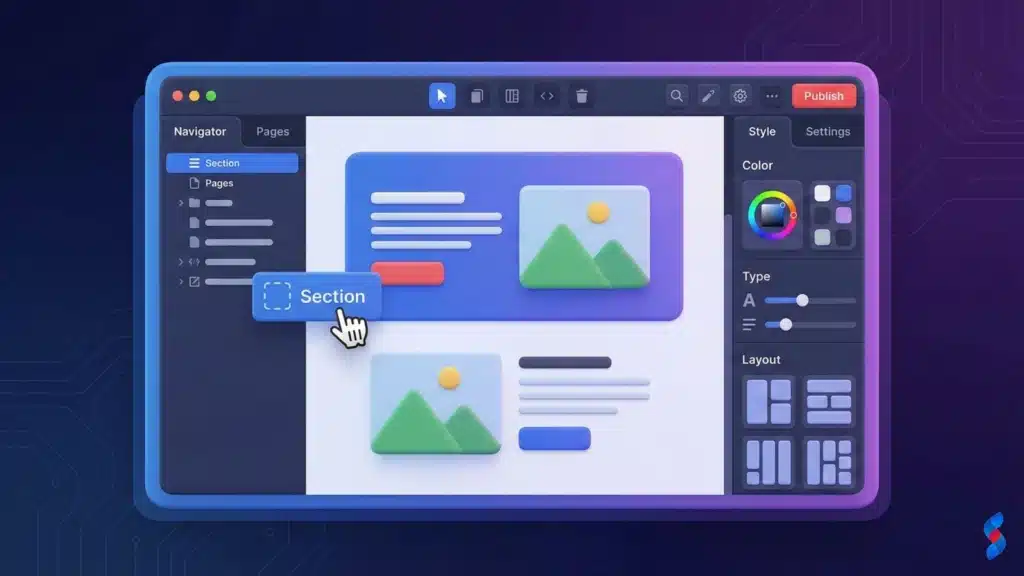
Defining Webflow as a visual website builder: Webflow provides a drag-and-drop interface that allows you to visually design your website. You can manipulate elements, adjust layouts, and add interactions without needing to code. This makes web design accessible to individuals with varying levels of technical expertise.
Explaining the core components: Designer, CMS, and Hosting: Webflow consists of three core components: the Designer, the CMS (Content Management System), and integrated hosting. The Designer is where you visually build your website. The Webflow CMS allows you to manage and update dynamic content like blog posts, portfolios, and e-commerce products. Finally, Webflow provides secure and reliable hosting for your website.
How Webflow differs from traditional coding methods: Unlike traditional coding methods that require you to write HTML, CSS, and JavaScript, Webflow allows you to visually create these elements. This speeds up the development process and makes it easier for non-coders to build professional websites. Our team in Dubai often finds this incredibly helpful for rapid prototyping.
Key Features and Benefits of Webflow
Webflow offers a wide array of features and benefits that make it a compelling choice for various website projects. Let’s explore some of the key advantages:
Visual Design Interface: Drag-and-drop functionality and customization options are at the heart of Webflow. The platform offers a user-friendly interface that allows you to visually design and customize every aspect of your website. You can easily drag and drop elements, adjust layouts, and fine-tune styling to create a unique and engaging user experience.
Webflow CMS: Managing dynamic content with ease is a significant advantage. The Webflow CMS simplifies the process of managing dynamic content such as blog posts, articles, portfolios, and e-commerce products. You can easily create, edit, and publish content without having to touch the website’s design or code. This is especially useful for content-heavy websites that require frequent updates.
Integrated Hosting: Performance and scalability considerations are paramount. Webflow provides integrated hosting on a fast and reliable infrastructure. This eliminates the need to find and manage your own hosting provider. Webflow’s hosting is optimized for performance and scalability, ensuring that your website can handle traffic spikes and deliver a smooth user experience.
SEO Friendliness: Built-in Webflow SEO tools and optimization capabilities help you rank higher in search results. Webflow offers a range of built-in SEO tools to help you optimize your website for search engines. You can easily customize meta titles and descriptions, create optimized URLs, and generate sitemaps. Webflow also ensures that your website is mobile-friendly and loads quickly, which are important factors for SEO.
E-commerce Functionality: Setting up and managing online stores is made easier with Webflow’s e-commerce capabilities. Webflow allows you to build and manage online stores with ease. You can create product pages, manage inventory, process payments, and handle shipping all within the Webflow platform. This makes it a great option for small to medium-sized businesses looking to sell products online.
Evaluating Webflow for Your Specific Project
Assessing Your Project Requirements
Before embarking on a Webflow website project, it’s essential to assess your specific needs and requirements.
Defining your website goals and objectives: What do you want to achieve with your website? Are you looking to generate leads, sell products, or build brand awareness? Defining your goals and objectives will help you determine the features and functionalities you need.
Identifying the required features and functionalities: What specific features do you need for your website? Do you need a blog, a portfolio, an e-commerce store, or a contact form? Identifying your required features will help you determine if Webflow is the right platform for your project.
Determining your budget and timeline: How much are you willing to spend on your website, and how quickly do you need it launched? Determining your budget and timeline will help you assess the feasibility of using Webflow for your project.
Webflow’s Strengths: Where It Excels
Webflow shines in several areas, making it a top choice for certain types of projects.
Rapid Prototyping: Quickly creating and iterating on designs is a major advantage. Webflow’s visual design interface allows you to rapidly prototype and iterate on designs. You can quickly create mockups, test different layouts, and refine your design based on user feedback. This makes it a great tool for agile development processes. In our experience, this has cut down development time significantly for our clients.
Custom Design Capabilities: Achieving unique and visually appealing websites is within reach. Webflow offers unparalleled design flexibility, allowing you to create truly unique and visually appealing websites. You are not limited by pre-built templates or themes. You have complete control over every aspect of your website’s design.
Content Management: Streamlining content creation and updates is simplified with the Webflow CMS. Webflow’s CMS simplifies the process of managing and updating your website’s content. You can easily create, edit, and publish content without having to touch the design or code. This is especially useful for websites that require frequent content updates.
SEO Performance: Optimizing your website for search engines is easier with Webflow’s built-in tools. Webflow provides a range of built-in SEO tools to help you optimize your website for search engines. You can customize meta titles and descriptions, create optimized URLs, and generate sitemaps. Webflow also ensures that your website is mobile-friendly and loads quickly, which are important factors for SEO. A client once asked us about improving their search rankings; we showed them how Webflow’s SEO features led to a measurable lift in their KPIs.
Scalability: Handling traffic spikes and future growth is not a problem. Webflow’s hosting infrastructure is designed for performance and scalability. Your website can handle traffic spikes and future growth without experiencing performance issues. This is crucial for businesses that anticipate significant growth in website traffic.
Webflow’s Limitations: Potential Drawbacks
While Webflow offers numerous benefits, it’s important to be aware of its potential limitations.
Learning Curve: Mastering the interface and advanced features can take time. Webflow has a steeper learning curve compared to simpler website builders like Wix or Squarespace. Mastering the interface and advanced features requires time and effort. However, once you get the hang of it, you’ll be able to build complex and sophisticated websites with ease.
Pricing: Understanding the Webflow pricing structure and potential expenses is important. Webflow’s pricing can be higher than some other website builders, especially if you need advanced features or a high traffic volume. It’s important to understand the pricing structure and factor in all potential expenses before committing to Webflow.
E-commerce Limitations: Scalability and advanced feature limitations compared to dedicated e-commerce platforms. While Webflow offers e-commerce functionality, it may not be suitable for large or complex online stores. Dedicated e-commerce platforms like Shopify offer more scalability and advanced features.
Vendor Lock-in: Dependence on the Webflow platform can be a concern. When you build your website on Webflow, you are dependent on the platform. If you decide to switch to another platform in the future, you may have to rebuild your website from scratch.
Limited Plugin Ecosystem: Smaller selection compared to WordPress. Compared to WordPress, Webflow has a smaller plugin ecosystem. This means that you may not be able to find plugins for all the features you need. However, Webflow’s built-in features and custom code capabilities can often compensate for the lack of plugins.
Webflow vs. Other Website Builders: A Comparative Analysis
Webflow vs. WordPress: A Detailed Comparison
Webflow and WordPress are two of the most popular website building platforms. Let’s compare them in detail:
Design Flexibility: Comparing customization options reveals Webflow’s edge. Webflow offers more design flexibility than WordPress. You have complete control over every aspect of your website’s design in Webflow. WordPress, on the other hand, relies on themes and plugins for design, which can limit your customization options.
Ease of Use: Evaluating the user interface and learning curve shows WordPress is easier to learn at first. WordPress is generally easier to learn than Webflow, especially for beginners. However, Webflow’s visual design interface can be more intuitive for designers.
SEO Capabilities: Analyzing Webflow SEO features and performance shows it has great built-in tools. Both Webflow and WordPress offer excellent SEO capabilities. Webflow has built-in SEO tools, while WordPress relies on plugins like Yoast SEO.
E-commerce Functionality: Comparing e-commerce capabilities shows WordPress has the edge with plugins like WooCommerce. WordPress, with plugins like WooCommerce, offers more robust e-commerce functionality than Webflow. However, Webflow’s e-commerce features are sufficient for many small to medium-sized online stores.
Pricing: Assessing the cost of ownership is critical when choosing a platform. Webflow’s pricing can be higher than WordPress, especially when you factor in hosting and other expenses. WordPress is free to use, but you’ll need to pay for hosting, themes, and plugins.
Webflow vs. Squarespace and Wix: Key Differences
Squarespace and Wix are simpler website builders than Webflow. Let’s look at the key differences:
Design Control: Evaluating the level of design customization shows Webflow provides more flexibility. Webflow offers significantly more design control than Squarespace and Wix. You have complete control over every aspect of your website’s design in Webflow. Squarespace and Wix offer limited customization options.
Scalability: Comparing the ability to handle growth shows Webflow is better. Webflow is more scalable than Squarespace and Wix. Webflow’s hosting infrastructure can handle traffic spikes and future growth. Squarespace and Wix may experience performance issues with high traffic volumes.
SEO Performance: Analyzing SEO capabilities shows Webflow is on par with the others. All three platforms offer good SEO capabilities. However, Webflow’s built-in SEO tools and focus on clean code can give it a slight edge.
Target Audience: Identifying the ideal user for each platform is important. Webflow is best for designers and developers who want complete control over their website’s design. Squarespace and Wix are better for beginners who want a simple and easy-to-use website builder.
Webflow Pricing and Plans: Understanding the Costs
Webflow Account Plans: Features and Pricing
Understanding Webflow pricing is crucial for planning your project. Webflow offers a variety of account plans to suit different needs.
Free Plan: Limitations and suitability for small projects. Webflow’s free plan is a great way to try out the platform and build a small website. However, it has limitations on the number of pages and features you can use.
Site Plans: Pricing tiers and features for different website needs. Webflow’s site plans offer more features and flexibility than the free plan. There are different tiers based on the number of pages, traffic volume, and e-commerce functionality you need.
E-commerce Plans: Pricing tiers and features for online stores. Webflow’s e-commerce plans are specifically designed for online stores. They offer features like product management, payment processing, and order management.
Here’s a sample table illustrating different Webflow pricing plans and their features:
Plan
Pricing (Monthly)
Key Features
Suitable For
Free
$0
2 Projects, Webflow Branding
Small personal projects
Basic
$14
Unlimited Projects, No Webflow Branding
Simple websites, blogs
CMS
$23
All Basic Features, CMS Functionality
Content-driven websites
Business
$39
All CMS Features, Increased Limits
Growing businesses
E-commerce Standard
$29
E-commerce Features, 2% Transaction Fee
Small online stores
E-commerce Plus
$74
E-commerce Features, Reduced Transaction Fee
Medium-sized online stores
Additional Costs to Consider
Beyond the account plan, there are other costs to consider for your Webflow website project.
Template Purchases: Cost of premium Webflow templates. While Webflow offers free templates, you may want to purchase a premium template for a more professional and unique design. Premium templates can range in price from $50 to $200.
Plugin and App Subscriptions: Cost of additional functionality. Webflow has a limited plugin ecosystem. You might need to subscribe to third-party services to add functionality to your website.
Freelancer or Agency Fees: Cost of professional help. If you don’t have the skills or time to build your website yourself, you may need to hire a freelancer or Webflow agency. Freelancer and agency fees can vary depending on the scope of your project.
Webflow for E-commerce: Building Online Stores
Setting Up an Online Store with Webflow
Webflow provides the tools to create a functional and visually appealing online store.
Choosing an e-commerce template: Start by selecting a template designed for e-commerce. Webflow offers a variety of e-commerce templates that you can customize to fit your brand.
Configuring product pages and categories: Set up your product pages with detailed descriptions, images, and pricing information. Organize your products into categories to make it easy for customers to find what they’re looking for.
Integrating payment gateways: Integrate with payment gateways like Stripe and PayPal to process payments securely. Webflow makes it easy to connect with popular payment processors.
Managing inventory and shipping: Manage your inventory and shipping settings within the Webflow platform. You can track inventory levels, set shipping rates, and manage orders.
Webflow E-commerce Features
Webflow offers a range of features designed to help you build and manage a successful online store.
Product Management: Adding and managing products is streamlined. Easily add and manage your products with Webflow’s product management system. You can add product descriptions, images, pricing, and variations.
Payment Processing: Integrating with payment gateways is essential. Webflow integrates with popular payment gateways like Stripe and PayPal to process payments securely. You can accept credit cards, debit cards, and other forms of payment.
Order Management: Tracking and fulfilling orders is straightforward. Track and fulfill orders with Webflow’s order management system. You can view order details, track shipping, and process refunds.
Marketing Tools: Promoting your online store is possible with integrated tools. Webflow offers a range of marketing tools to help you promote your online store. You can create email campaigns, run promotions, and track your marketing performance.
Optimizing Your Webflow Website for SEO
On-Page SEO Best Practices
Optimizing your Webflow website project for search engines is crucial for driving traffic and generating leads. Here are some on-page SEO best practices:
Keyword Research: Identifying relevant keywords is the first step. Research relevant keywords that your target audience is searching for. Use keyword research tools like Google Keyword Planner and Ahrefs to identify high-volume, low-competition keywords.
Title Tags and Meta Descriptions: Optimizing for search engines helps improve click-through rates. Optimize your title tags and meta descriptions for each page of your website. Use your target keywords in your title tags and meta descriptions to improve your search engine rankings.
Header Tags: Structuring content for readability and SEO is crucial. Use header tags (H1, H2, H3, etc.) to structure your content and make it easy to read. Use your target keywords in your header tags to improve your search engine rankings.
Image Optimization: Compressing and optimizing images can improve website speed. Compress and optimize your images to improve your website’s loading speed. Use descriptive alt tags for your images to improve accessibility and SEO.
Internal Linking: Linking to relevant pages on your website improves user experience and SEO. Link to relevant pages on your website to improve user experience and SEO. Internal linking helps search engines understand the structure and content of your website.
Technical SEO Considerations
Technical SEO is just as important as on-page SEO.
Website Speed: Optimizing for fast loading times improves user experience and SEO. Optimize your website for fast loading times. Use a content delivery network (CDN), compress your images, and minimize your code to improve your website’s speed.
Mobile Responsiveness: Ensuring a mobile-friendly design is essential for SEO. Ensure that your website is mobile-friendly. Google prioritizes mobile-friendly websites in its search rankings.
Schema Markup: Implementing structured data helps search engines understand your content. Implement schema markup to help search engines understand the content of your website. Schema markup provides structured data that search engines can use to display rich snippets in search results.
Sitemap Submission: Submitting your sitemap to search engines helps them crawl your website. Submit your sitemap to search engines like Google and Bing. A sitemap is a file that lists all the pages on your website, making it easier for search engines to crawl and index your content.
Webflow Development: Advanced Customization and Integrations
Custom Code and Integrations
Webflow allows for advanced customization through custom code and integrations.
Adding custom HTML, CSS, and JavaScript: Webflow allows you to add custom HTML, CSS, and JavaScript to your website. This gives you complete control over the look and feel of your website.
Integrating with third-party services: Integrate with third-party services like Google Analytics, Mailchimp, and Zapier to add functionality to your website.
Using Webflow’s API: Use Webflow’s API to build custom integrations and automate tasks.
Maintaining code quality and consistency: Write clean, well-documented code. Use consistent naming conventions and formatting.
Optimizing code for performance: Optimize your code for performance. Minimize your code, compress your images, and use a CDN.
Testing and debugging code: Thoroughly test your code to identify and fix any bugs.
Common Misconceptions About Webflow
Debunking Webflow Myths
Let’s address some common misconceptions about Webflow:
Myth:Webflow design is only for designers. Reality: Webflow is a powerful tool for both designers and developers. While it has a visual design interface that is appealing to designers, it also offers advanced features and custom code capabilities that are useful for developers.
Myth: Webflow is too expensive. Reality:Webflow’s pricing is competitive, and it offers a range of plans to suit different budgets. While it may be more expensive than some other website builders, it offers more features and flexibility.
Myth: Webflow websites are slow. Reality: Webflow websites can be highly performant with proper optimization. Webflow’s hosting infrastructure is designed for speed and scalability.
> “Webflow empowers creators to build professional websites without code, bridging the gap between design and development.” – Vlad Magdalin, Webflow CEO
Real-World Webflow Website Examples
Showcasing Successful Webflow Projects
Let’s take a look at some successful Webflow website project examples:
Highlighting websites built with Webflow across different industries showcases its versatility. Many businesses in various industries have successfully used Webflow to create stunning websites. Examples include marketing agencies, e-commerce stores, and personal portfolios.
Analyzing the design, functionality, and performance of these websites provides valuable insights. These websites demonstrate Webflow’s ability to create visually appealing and highly functional websites.
Providing insights into why Webflow was the right choice for these projects can help you decide if Webflow is right for you. Webflow’s design flexibility, CMS capabilities, and SEO tools make it a great choice for many website projects.
Conclusion: Is Webflow the Right Choice for You?
Summarizing the Key Benefits and Considerations
Webflow is a powerful platform that offers a unique blend of design flexibility, content management, and hosting. It’s a great choice for designers and developers who want complete control over their website’s design.
Recap of Webflow’s strengths and limitations: Webflow’s strengths include its visual design interface, CMS capabilities, SEO tools, and scalability. Its limitations include its learning curve, pricing, and limited plugin ecosystem.
Final thoughts on when Webflow is a good fit: Webflow is a good fit for projects that require a high degree of design customization and a focus on SEO. It’s also a good choice for businesses that want to manage their own content.
Encouragement to explore Webflow further and try it out: We encourage you to explore Webflow further and try it out for yourself. Its free plan is a great way to get started and see if it’s the right platform for your project.
We at SkySol Media believe that Webflow provides the perfect blend of power and ease of use for modern website development.
Q: What is Webflow?
A: Webflow is a visual website builder that allows you to create custom, responsive websites without writing code.
Q: Is Webflow good for SEO?
A: Yes, Webflow is excellent for SEO. It offers built-in SEO tools and generates clean, semantic code that search engines love.
Q: How much does Webflow cost?
A: Webflow pricing varies depending on the plan you choose. There is a free plan with limited features, and paid plans start at around $14 per month.
Q: Can I use Webflow for e-commerce?
A: Yes, Webflow offers e-commerce functionality, allowing you to build and manage online stores.
Q: Is Webflow better than WordPress?
A: It depends on your needs. Webflow offers more design flexibility, while WordPress has a larger plugin ecosystem.
Q: Is Webflow easy to learn?
A: Webflow has a steeper learning curve than some other website builders, but it’s worth the effort if you want complete control over your website’s design.
Q: What are Webflow templates?
A: Webflow templates are pre-designed website layouts that you can use as a starting point for your website.
Q: Can I integrate Webflow with other tools?
A: Yes, Webflow integrates with many third-party services like Google Analytics, Mailchimp, and Zapier.
Q: Do I need to know code to use Webflow?
A: No, you don’t need to know code to use Webflow, but some knowledge of HTML, CSS, and JavaScript can be helpful for advanced customization.
Q: What is Webflow CMS?
A: Webflow CMS is Webflow’s content management system, which allows you to easily manage and update your website’s content.
Q: How can a Webflow agency help me?
A: A Webflow agency can help you design, develop, and optimize your Webflow website. They can also provide training and support.
Q: What is Webflow development?
A: Webflow development refers to the process of building and customizing websites using the Webflow platform. It involves designing the website’s layout, adding content, and integrating with third-party services.
Q: What is a no-code website builder?
A: A no-code website builder is a platform that allows you to create websites without writing any code. Webflow is a popular example of a no-code website builder.
Q: Is Webflow a visual website builder?
A: Yes, Webflow is a visual website builder, meaning you can design your website using a drag-and-drop interface without needing to write code.
Q: What is a Webflow tutorial?
A: A Webflow tutorial is a guide or lesson that teaches you how to use Webflow to build websites. There are many free and paid tutorials available online.
Q: What are the advantages of using Webflow for Webflow e-commerce?
A: The advantages of using Webflow for Webflow e-commerce include its design flexibility, ease of use, and built-in SEO tools.
Considering Webflow for your next web project? This guide dives deep into Webflow's pros, cons, and ideal use cases. Learn if its visual development platform suits your needs and budget. Make an informed decision for 2025.
Considering Webflow for your next website? This guide dives deep into Webflow website projects, covering benefits, challenges, costs, and if it's the right fit for you. Make an informed decision and ensure a successful Webflow implementation.
Is Webflow the right platform for your next website? This guide explores the pros and cons of choosing Webflow, helping you make an informed decision. Learn about Webflow's capabilities, limitations, and when it's the ideal solution for your web development needs.
Considering Webflow for your next website project? This guide dives deep into Webflow's capabilities, benefits, and potential drawbacks. Learn if Webflow is the right choice for your needs and how to maximize its potential for stunning and effective websites. Discover expert insights to make informed decisions.
Discover if Webflow is the right choice for your next web project. Our comprehensive guide explores its features, benefits, limitations, and provides real-world examples to help you make an informed decision. Learn more about Webflow's capabilities for 2025.
Embarking on a Webflow website project? This guide provides a candid assessment of Webflow's strengths and weaknesses, helping you determine if it's the right platform for your needs. Learn how to maximize your project's success in 2025 with our expert insights.