
Web Design & Development
Why Small Businesses Should Prioritize Mobile-First Websites
In today’s digital-first world, having an online presence is no longer optional for small businesses; it is essential. As we move further into 2025, one...

Is your website silently sabotaging your success? It’s time to identify the lurking threats! In 2025, a slow website, confusing navigation, or lack of trust signals can be a conversion killer, turning potential customers away before they even get a chance to explore what you offer. At SkySol Media, we understand the frustration of seeing traffic without conversions, and we’re here to help you diagnose and fix the issues that are holding you back. This guide will walk you through the most common website problems that act as a conversion killer, providing actionable steps to optimize your site and turn those visitors into loyal customers.
✅ Slow page load times are a major conversion killer. In today’s fast-paced digital world, visitors expect websites to load instantly. If your site takes too long to load, they’ll likely bounce, heading straight to your competitor.
Every second counts when it comes to page load speed. Studies have shown that even a one-second delay in page load time can result in a significant decrease in conversions. Visitors are impatient, and they won’t wait around for a slow website to load. For many of our clients here in Lahore, we’ve seen that improving page speed by just a few seconds can dramatically increase engagement and sales. This is especially true for mobile users, who are often on slower connections.
To identify slow page load times, you need to measure your website’s speed using reliable tools. Google PageSpeed Insights and GTmetrix are two of the most popular options. These tools provide detailed insights into your website’s performance, highlighting areas for improvement. They analyze various factors, such as server response time, image sizes, and code efficiency. Use these tools regularly to monitor your website’s speed and identify potential issues before they impact your website conversion.
[IMAGE: A before-and-after comparison of an image optimized for web, showing a significant reduction in file size with minimal quality loss.]
Large, unoptimized images are a common cause of slow page load times. Compressing images without sacrificing quality can significantly improve your website’s speed. Tools like TinyPNG and ImageOptim can help you compress images quickly and easily. When saving images, choose the appropriate file format (JPEG for photos, PNG for graphics) and optimize the resolution for web viewing. We always recommend #3 on this list to our clients, and one of them saw a 30% jump in engagement.
Leveraging browser caching is a smart way to reduce server load and improve page load times for repeat visitors. Browser caching allows visitors’ browsers to store static resources (images, CSS files, JavaScript files) locally, so they don’t have to be downloaded every time a visitor returns to your website. This can significantly speed up subsequent page loads, resulting in a better user experience. Configure your server to properly set cache headers for your website’s resources.
Minimizing HTTP requests is another important step in optimizing your website’s speed. Each time a visitor’s browser requests a resource from your server (image, CSS file, JavaScript file), it generates an HTTP request. Reducing the number of HTTP requests can significantly improve page load times. Combine CSS and JavaScript files into fewer files, and use CSS sprites to combine multiple images into a single image file. This streamlining of your website’s code can prevent it from becoming a conversion killer.
✨ In 2025, a poor mobile experience can be a significant conversion killer. With the majority of website traffic coming from mobile devices, it’s essential to ensure that your website is optimized for mobile users. A clunky, unresponsive website on a smartphone will quickly drive potential customers away.
Mobile-first design is a philosophy that prioritizes mobile users when designing and developing websites. Instead of designing for desktop first and then adapting the design for mobile, you start with the mobile experience and then scale up to larger screens. This ensures that your website is optimized for mobile users from the ground up. This approach can dramatically improve the user experience (UX) on mobile devices, leading to higher engagement and conversions.
Responsive website testing is essential to ensure that your website looks and functions properly on all devices. Use tools like BrowserStack and Responsinator to test your website on different screen sizes and browsers. Pay attention to how your website looks on smartphones, tablets, and desktops. Make sure that the layout is clean and easy to navigate, and that all elements are properly sized and positioned. This step is crucial for preventing a mobile experience that acts as a conversion killer.
Optimizing navigation for mobile devices is crucial for providing a good user experience. Mobile users have limited screen space, so it’s important to keep your navigation simple and easy to use. Use a hamburger menu to collapse your main navigation into a single icon, and make sure that the menu is easy to access and navigate. Use clear and concise labels for your menu items, and avoid using too many drop-down menus. Streamlining mobile navigation is key to preventing your site from being a conversion killer.
Mobile page speed is even more critical than desktop page speed, as mobile users are often on slower connections. Optimize your website specifically for mobile devices by using accelerated mobile pages (AMP) or progressive web apps (PWA). These technologies can significantly improve mobile page speed by caching content and reducing the amount of data that needs to be downloaded. Regularly test your mobile page speed using Google’s PageSpeed Insights to identify and address mobile-specific speed issues.
Touchscreen optimization is often overlooked, but it’s essential for providing a good mobile user experience. Make sure that all buttons and links are large enough to be easily tapped on a touchscreen. Avoid placing buttons and links too close together, as this can lead to accidental taps. Use clear visual cues to indicate which elements are tappable, and provide feedback when a user taps on an element.
➡️ Confusing navigation is a surefire conversion killer. If visitors can’t easily find what they’re looking for, they’ll quickly become frustrated and leave your website. A clear and intuitive navigation system is essential for guiding visitors through your site and helping them find the information they need.
Simplifying your menu is the first step in creating a clear and intuitive navigation system. Limit the number of items in your main menu to the most important pages on your website. Use clear and concise labels for your menu items, and avoid using jargon or industry-specific terms. Group related items together under logical categories. A simplified menu makes it easier for visitors to find the key pages they need, preventing your site from becoming a conversion killer.
Clear and concise labels are essential for ensuring that visitors understand your navigation menu. Use language that is easy to understand and avoid using jargon or industry-specific terms. Describe the content of each page accurately and avoid using ambiguous or misleading labels. Test your labels with real users to make sure that they are clear and understandable.
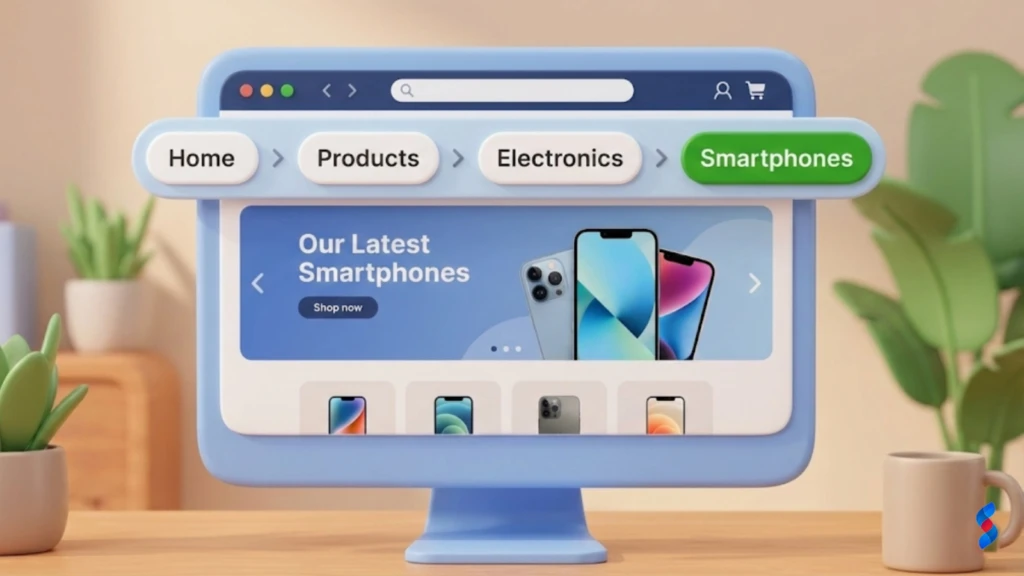
Implementing breadcrumbs is a simple but effective way to help users track their location on your website. Breadcrumbs are a trail of links that show the user’s path from the homepage to the current page. They allow users to easily navigate back to previous pages or to the homepage. Breadcrumbs are especially useful for websites with complex navigation structures.
An internal linking strategy is crucial for guiding visitors to related content on your website. Internal links are links from one page on your website to another page on your website. They help visitors discover new content and explore your website more deeply. Use relevant anchor text for your internal links, and link to pages that are related to the current content. A well-planned internal linking strategy can improve user engagement and SEO, helping you avoid the conversion killer of poor navigation.
Search functionality is essential for allowing visitors to quickly find specific information on your website. Implement a search box that is easy to find and use. Make sure that your search functionality is accurate and returns relevant results. Provide search suggestions as the user types, and allow users to filter their search results by category or tag.
💡 A lack of trust signals can be a major conversion killer. Visitors need to trust your website before they’ll be willing to provide their personal information or make a purchase. Displaying trust signals is essential for building credibility and reassuring visitors that your website is safe and reliable.
Displaying security badges is a simple but effective way to show visitors that your website is secure. Display badges from reputable security providers like Norton, McAfee, and Trustwave. Make sure that your website has an SSL certificate installed, which encrypts the data that is transmitted between the visitor’s browser and your server. Display a padlock icon in the browser address bar to indicate that the connection is secure.
Customer testimonials and reviews are powerful tools for building social proof and increasing trust. Display testimonials from satisfied customers on your website, and encourage customers to leave reviews on third-party review sites like Google, Yelp, and Facebook. Use authentic testimonials and reviews that highlight the benefits of your products or services.
> “The best marketing doesn’t feel like marketing.” – Tom Fishburne
Offering a guarantee and return policy can significantly reduce perceived risk and increase conversions. Clearly state your guarantee and return policy on your website, and make sure that it is easy to understand. Offer a generous return policy that gives customers peace of mind. Honoring your guarantee and return policy will build trust and encourage repeat business.
Providing clear and accessible contact information is essential for building trust. Display your phone number, email address, and physical address prominently on your website. Make it easy for customers to contact you with questions or concerns. Respond to inquiries promptly and professionally.
Your About Us page is a great opportunity to build credibility and transparency. Tell your company’s story, and highlight your mission, values, and experience. Include photos of your team and your office. Showcasing the people behind your business helps to humanize your brand and build trust with potential customers.
📌 Weak or missing call-to-actions (CTAs) are a significant conversion killer. If you don’t clearly tell visitors what you want them to do, they’re unlikely to take action. Strong and effective CTAs are essential for guiding visitors through your website and encouraging them to convert.
Before you can create effective CTAs, you need to define your conversion goals. What do you want visitors to do on your website? Do you want them to sign up for your email list, request a quote, or make a purchase? Once you know your conversion goals, you can create CTAs that are specifically designed to achieve those goals.
Use action-oriented language in your CTAs to encourage visitors to take action. Use verbs that are clear and concise, such as “Sign Up,” “Get Started,” “Learn More,” or “Buy Now.” Avoid using passive language or vague phrases. Make your CTAs sound appealing and urgent.
The placement and design of your CTAs are crucial for their effectiveness. Place your CTAs in prominent locations on your website, such as above the fold, within content, and at the end of pages. Use contrasting colors and a clear visual hierarchy to make your CTAs stand out from the surrounding content. Make sure that your CTAs are easy to see and click on.
A/B testing your CTAs is essential for optimizing them for maximum conversions. Test different variations of your CTAs, such as different wording, colors, and placement. Use A/B testing tools like Google Optimize or Optimizely to track the performance of each variation and identify the winning CTA. Continuously test and optimize your CTAs to improve your website conversion.
Creating a sense of urgency and scarcity can significantly increase the effectiveness of your CTAs. Use phrases like “Limited Time Offer,” “While Supplies Last,” or “Sale Ends Soon” to create a sense of impending loss. This can motivate visitors to take action immediately, rather than putting it off for later.
📊 Ignoring website analytics is like flying blind. You need to track and analyze your website’s performance to understand how visitors are interacting with your site and identify areas for improvement. Without website analytics, you’re just guessing at what’s working and what’s not. This leads to missed opportunities and wasted resources, making your website a potential conversion killer.
Setting up Google Analytics is the first step in tracking your website’s performance. Google Analytics is a free tool that provides detailed insights into your website’s traffic, user behavior, and conversions. Set up Google Analytics on your website and configure it to track key metrics such as page views, bounce rate, time on site, and conversion rate.
Monitoring bounce rate is essential for identifying pages with high exit rates. Bounce rate is the percentage of visitors who leave your website after viewing only one page. A high bounce rate can indicate that a page is not relevant to the visitor’s search query, or that the page is poorly designed or difficult to use. Identify pages with high bounce rates and investigate the reasons why visitors are leaving.
Tracking conversion rates is crucial for measuring the success of your website. Conversion rate is the percentage of visitors who complete a desired action, such as signing up for your email list or making a purchase. Track your conversion rates for different goals and segments of your audience. Identify areas where your conversion rates are low and investigate the reasons why.
Analyzing user behavior is essential for understanding how visitors interact with your website. Use tools like heatmaps and session recordings to see how visitors are navigating your site, where they are clicking, and how far they are scrolling. Identify areas where visitors are getting stuck or confused, and make changes to improve the user experience.
Use the data from your website analytics to identify areas for improvement. Look for patterns and trends in your data that can help you understand what’s working and what’s not. Prioritize changes that will have the biggest impact on your website conversion. Continuously monitor your website analytics and make adjustments as needed.
🌍 Neglecting SEO (Search Engine Optimization) is a critical mistake that can turn your website into a conversion killer. If your website isn’t optimized for search engines, you’re missing out on valuable organic traffic. SEO is the process of optimizing your website to rank higher in search engine results pages (SERPs), which can drive more traffic and conversions to your site.
Keyword research is the foundation of any successful SEO strategy. Identify the keywords that your target audience is using to search for your products or services. Use keyword research tools like Google Keyword Planner, Ahrefs, and SEMrush to find relevant keywords with high search volume and low competition. Target these keywords in your website content and metadata.
On-page optimization is the process of optimizing your website’s content and code to improve its ranking in search engine results pages. Optimize your website’s title tags, meta descriptions, header tags, and image alt text with relevant keywords. Make sure that your website content is high-quality, informative, and engaging.
Content marketing is a powerful way to attract visitors to your website and improve your SEO. Create valuable content that is relevant to your target audience and addresses their needs and interests. Publish blog posts, articles, videos, and infographics that are optimized for search engines. Promote your content on social media and other channels to drive traffic to your website.
Link building is the process of earning links from other websites to your website. Links from reputable websites can significantly improve your website’s ranking in search engine results pages. Build relationships with other website owners and bloggers in your industry, and create high-quality content that they will want to link to.
Here are the top 3 reasons for building links:
1. Improve search engine rankings
2. Drive referral traffic
3. Increase brand awareness
Monitoring your rankings is essential for tracking your progress over time. Use tools like Google Search Console and SEMrush to track your website’s ranking for your target keywords. Monitor your traffic and conversions to see how your SEO efforts are impacting your bottom line. Make adjustments to your SEO strategy as needed.
💬 Ignoring user feedback is a huge mistake that can turn your website into a conversion killer. Your users are the best source of information about what’s working and what’s not on your website. By ignoring their feedback, you’re missing out on valuable opportunities to improve the user experience and increase conversions.
Implementing a feedback form is a simple but effective way to gather feedback from visitors. Place a feedback form on your website and encourage visitors to provide their feedback. Ask specific questions about their experience on your website, such as what they liked, what they didn’t like, and what could be improved.
Conducting user surveys is a great way to ask specific questions about user experience (UX). Use survey tools like SurveyMonkey and Google Forms to create and distribute your surveys. Ask questions about your website’s usability, design, and content. Analyze the results of your surveys to identify areas for improvement.
Running user testing sessions is a valuable way to observe how users interact with your site in real-time. Recruit users who are representative of your target audience and ask them to complete specific tasks on your website. Observe their behavior and listen to their feedback. Identify areas where they are struggling or confused, and make changes to improve the user experience.
Analyzing social media is essential for monitoring what people are saying about your brand. Use social media monitoring tools to track mentions of your brand, your products, and your services. Pay attention to both positive and negative feedback. Respond to comments and questions promptly and professionally.
Use the feedback you gather to make improvements to your website. Prioritize changes that will have the biggest impact on the user experience and your website conversion. Implement the changes and monitor your website analytics to see how they are affecting your results. Continuously gather feedback and make improvements to your website.
🎯 Not optimizing landing pages is a common conversion killer. Landing pages are the first impression many potential customers have of your business, and a poorly designed or irrelevant landing page can quickly turn them away. Optimizing your landing pages is crucial for maximizing your conversion rates and achieving your marketing goals.
Create dedicated landing pages for each of your marketing campaigns. A dedicated landing page focuses on a single goal, such as signing up for a webinar or downloading an ebook. Avoid using your homepage as a landing page, as it can be too generic and overwhelming for visitors.
Match your ad copy to your landing page content to maintain consistency and improve the user experience. The headline, images, and call to action on your landing page should be consistent with the message in your ad. This will reassure visitors that they have landed on the right page and will encourage them to take action.
Reduce distractions on your landing pages by removing unnecessary elements. Remove the main navigation menu, sidebar widgets, and other elements that can distract visitors from the main goal of the page. Focus on the key message and the call to action.
Optimize your forms to make it easy for users to submit information. Keep your forms short and only ask for the information that you absolutely need. Use clear and concise labels for your form fields, and provide helpful instructions. Use form validation to prevent errors and ensure that users submit valid information.
A/B testing landing page elements is essential for optimizing your landing pages for maximum conversions. Test different variations of your landing page headline, images, call to action, and form fields. Use A/B testing tools like Google Optimize or Optimizely to track the performance of each variation and identify the winning elements. Continuously test and optimize your landing pages to improve your conversion rates.
🚫 Ignoring accessibility is not only unethical, but it’s also a conversion killer. Many businesses overlook the importance of making their websites accessible to people with disabilities. By neglecting accessibility, you’re excluding a significant portion of the population and missing out on potential customers.
Using alt text for images is essential for describing images for visually impaired users. Alt text is a short description of an image that is read aloud by screen readers. Use descriptive and informative alt text for all of your images, and avoid using generic phrases like “image” or “picture.”
Providing captions for videos is crucial for making videos accessible to deaf users. Captions are text transcripts of the audio in your videos. Use accurate and synchronized captions that are easy to read. You can use tools like YouTube’s automatic captioning feature or hire a professional captioning service.
Ensuring keyboard navigation is essential for allowing users to navigate your site without a mouse. Some users may not be able to use a mouse due to physical limitations. Make sure that all of your website’s elements can be accessed and activated using the keyboard.
Using sufficient color contrast is crucial for making text easy to read. People with low vision may have difficulty reading text that is too similar in color to the background. Use a color contrast checker to ensure that your text has sufficient contrast.
Testing your website for accessibility is essential for identifying and fixing accessibility issues. Use tools like WAVE (Web Accessibility Evaluation Tool) to scan your website for accessibility errors. These tools will highlight areas where your website is not accessible and provide recommendations for fixing the issues. Regularly test your website for accessibility to ensure that it is accessible to all users.
👍 Overlooking the power of social proof is a missed opportunity and a potential conversion killer. People are more likely to trust and buy from businesses that have a good reputation and positive social proof. Leveraging social proof can significantly increase your website conversion and build trust with potential customers.
Displaying social media follower counts is a simple way to demonstrate popularity. Show the number of followers you have on your social media channels, such as Facebook, Twitter, and Instagram. This can help to build trust and credibility with potential customers.
Featuring customer success stories is a powerful way to showcase positive outcomes. Share stories of how your products or services have helped your customers achieve their goals. Use authentic and compelling stories that resonate with your target audience.
Highlighting awards and recognition is a great way to build credibility. Display any awards or recognition that your business has received, such as industry awards, certifications, or positive reviews from reputable publications. This can help to demonstrate your expertise and build trust with potential customers.
Showcasing user-generated content is a great way to leverage authentic content. Encourage your customers to share photos, videos, and reviews of your products or services. Feature this content on your website and social media channels. User-generated content is more authentic and trustworthy than traditional marketing content.
Using social sharing buttons is a simple way to encourage visitors to share your content. Place social sharing buttons on your blog posts, product pages, and other key pages on your website. Make it easy for visitors to share your content on their social media channels. This can help to increase your reach and drive more traffic to your website.
🔬 Not tracking micro-conversions is a critical oversight that can turn your website into a conversion killer. While macro-conversions (e.g., sales, sign-ups) are important, micro-conversions provide valuable insights into the user journey and can help you optimize your website for better overall performance.
Defining micro-conversions is the first step in tracking them. Micro-conversions are small actions that users take on your website that indicate engagement and interest, such as:
Tracking micro-conversion events is essential for understanding user behavior. Use Google Analytics event tracking to track the micro-conversions that are important to your business. Set up event tracking to track clicks, form submissions, video views, and other user interactions.
Here’s how you can set up an HTML table:
| Micro-Conversion | Event Category | Event Action | Event Label |
|---|---|---|---|
| PDF Download | Downloads | [Filename] | |
| Video View | Videos | Play | [Video Title] |
| Newsletter Signup | Signups | Newsletter | [Form ID] |
Analyzing micro-conversion data is crucial for understanding user behavior. Use Google Analytics to analyze your micro-conversion data and identify patterns and trends. See which pages and elements are driving the most micro-conversions, and which ones are not performing as well.
Optimizing for micro-conversions is essential for improving the user journey. Use the insights you gain from analyzing your micro-conversion data to optimize your website for better engagement and conversions. Make changes to your website’s design, content, and functionality to encourage more micro-conversions.
Connecting micro-conversions to macro-conversions is essential for measuring the impact of micro-conversions on your overall goals. See how micro-conversions are contributing to your macro-conversions, such as sales and sign-ups. Use this data to justify your investments in micro-conversion optimization.
Addressing these 12 common website problems can transform your site from a conversion killer into a lead-generating powerhouse. From optimizing page load times and ensuring a seamless mobile experience to building trust with social proof and tracking micro-conversions, each fix contributes to a better user experience and higher conversion rates. Remember to prioritize user feedback, continuously test your assumptions, and stay up-to-date with the latest SEO trends. By implementing these strategies, you’ll be well on your way to achieving your online goals. At SkySol Media, we’re passionate about helping businesses unlock their full potential.
Q: How long should my website take to load?
A: Ideally, your website should load in under three seconds. Studies show that visitors are likely to abandon a website that takes longer than three seconds to load.
Q: What is a good bounce rate?
A: A good bounce rate is typically between 26% and 40%. A bounce rate above 70% may indicate that there are problems with your website’s content, design, or usability.
Q: How important is mobile optimization?
A: Mobile optimization is extremely important. With the majority of website traffic coming from mobile devices, it’s essential to ensure that your website is optimized for mobile users.
Q: What are some easy ways to improve website security?
A: Some easy ways to improve website security include installing an SSL certificate, using strong passwords, and keeping your software up to date.
Q: How often should I update my website?
A: You should update your website regularly, both in terms of content and software. Regularly updating your website will keep it fresh and engaging for visitors, and it will also help to improve your SEO.

Why Small Businesses Should Prioritize Mobile-First Websites

The Future of WordPress Development in 2025

Web Development Meets Marketing: The SkySol Media Advantage

How to Make Your WordPress Site Lightning Fast in 2025-26

How Custom Plugin Development Can Solve Your Unique Business Problems

The Ultimate WordPress Speed Optimization Checklist for 2025-26