Why Our Web Hosting Services Are Perfect for Your Online Growth in 2025
Why Our Web Hosting Services Are Perfect for Your Online Growth in 2025: In today’s digital age, where businesses are expected to provide lightning-fast user...



Shared hosting enough? That’s a question we at SkySol Media get asked frequently, especially by startups and small businesses just getting their online presence established. The truth is, whether shared hosting is “enough” depends entirely on your specific needs, goals, and technical capabilities. This article will delve into the amazing truth about shared hosting in 2025, exploring its benefits, limitations, and when it’s time to consider other hosting options.
Shared web hosting is a type of web hosting where multiple websites reside on a single physical server. This means that the server’s resources, such as CPU, RAM, and storage space, are shared among all the websites hosted on that server. Think of it like an apartment building.
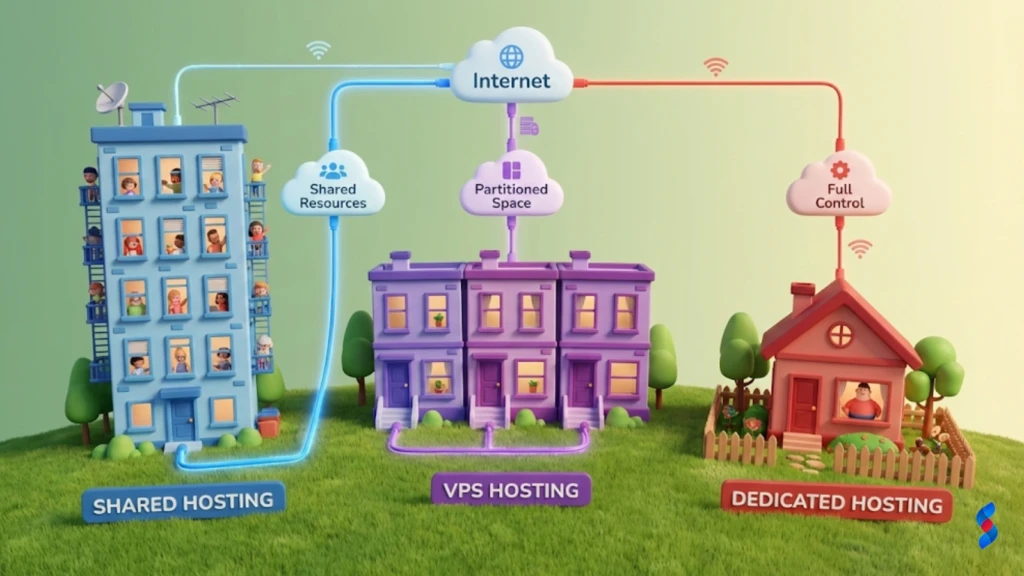
In our experience, understanding this shared environment is crucial for making an informed decision.
Shared web hosting comes with several key features that make it an attractive option for many website owners:
We often advise clients that shared website hosting is like renting a fully furnished apartment where the landlord takes care of all the maintenance.
Shared hosting is particularly well-suited for:
If you’re just starting out and don’t anticipate a large volume of traffic, shared hosting can be a cost-effective way to get your website online. Our experience shows that many successful businesses began with shared hosting before scaling up.
The primary advantage of shared hosting is its cost-effectiveness.
For startups, every dollar counts, and shared hosting allows them to allocate resources to other critical areas of their business.
Shared hosting simplifies website management.
This ease of use allows website owners to focus on creating content and marketing their website rather than dealing with complex server administration tasks.
With shared hosting, the hosting provider takes care of all the server maintenance tasks.
Shared hosting offers some degree of scalability, although it’s limited compared to other hosting options.
When our clients ask about scalability, we emphasize the importance of understanding the long-term growth potential of their website.
One of the main limitations of shared hosting is resource constraints.
Shared hosting can sometimes lead to performance issues.
Security is another concern with shared hosting.
We always recommend implementing additional security measures, such as strong passwords and regular backups, to mitigate these risks.
Shared hosting offers limited customization options.
This lack of customization can be a hindrance for websites that require specific software or configurations.
If your website consistently experiences high traffic volumes, shared hosting may not be sufficient.
Websites running complex applications or databases may also outgrow shared hosting.
E-commerce websites require enhanced security and performance, which shared hosting may not always provide.
If your website requires specific software or server configurations, shared hosting may not be suitable.
VPS hosting is a type of web hosting that provides a virtualized server with dedicated resources.
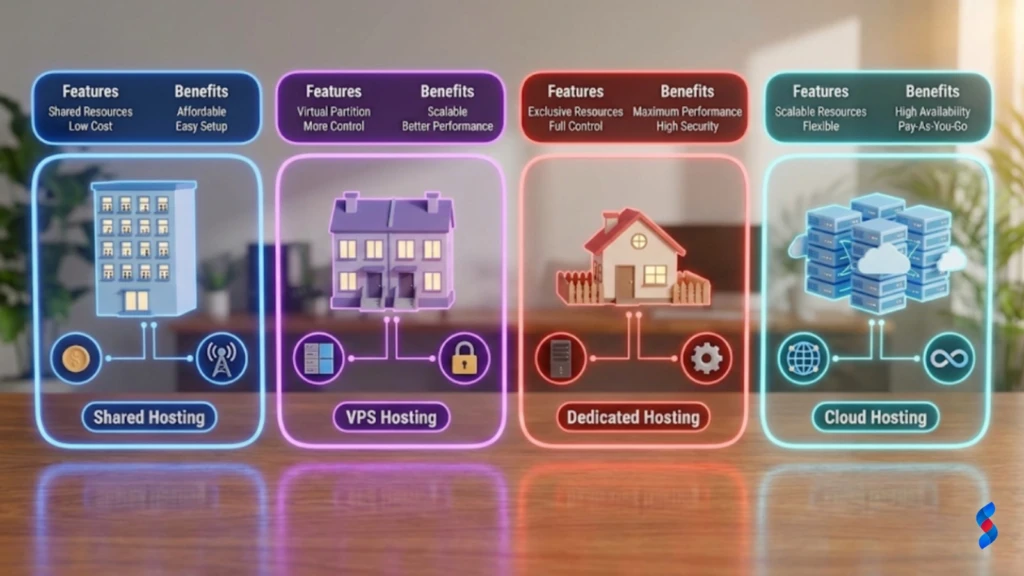
Dedicated server hosting provides an entire physical server dedicated to your website.
Cloud hosting utilizes a network of virtual servers to provide scalable resources.
Managed WordPress hosting is a hosting environment optimized specifically for WordPress websites.
Estimating your current and future website traffic is crucial when choosing a hosting plan.
Assessing the CPU, RAM, and storage needs of your website is essential.
Evaluating the security requirements for your website is critical.
Consider your technical skills and comfort level with server management.
A personal blog with low traffic, a simple design, and minimal resource requirements can thrive on shared hosting. This demonstrates the suitability of shared web hosting for basic websites. Many hobby bloggers find that shared hosting meets their needs perfectly.
An online store struggling with slow loading times, security vulnerabilities, and scalability issues highlights the need for VPS or dedicated hosting for e-commerce. These websites often require more robust solutions to handle transactions and customer data securely.
A growing startup transitioning from shared hosting to VPS due to increased traffic, resource demands, and the need for greater control illustrates the scalability benefits of VPS hosting. As their business expands, they need more resources and control over their server environment.
This isn’t always true. Optimized shared hosting environments, offered by reputable hosting providers with quality infrastructure, can provide good performance. Website speed is also affected by factors beyond hosting, such as website optimization and the use of a CDN.
While shared hosting can have security vulnerabilities, hosting providers implement security measures to protect shared hosting environments. Furthermore, website security best practices (e.g., strong passwords, regular backups) and additional security tools can enhance security.
Hosting providers are increasingly implementing technologies to improve shared hosting performance. This includes SSD storage, caching mechanisms, and optimized server configurations. Efforts are also being made to minimize the “noisy neighbor” effect.
Advanced security features are being implemented to protect shared hosting environments. This includes intrusion detection systems, malware scanning, and DDoS protection. Compliance with stricter data privacy regulations is also becoming increasingly important.
Artificial intelligence is being used to automate server management tasks, predict resource allocation, optimize performance, and proactively monitor security threats. This helps to improve the efficiency and reliability of shared hosting environments.
“Shared hosting is a fantastic entry point for many online ventures, offering an accessible and budget-friendly start. However, it’s crucial to recognize its limitations, especially when anticipating growth or dealing with resource-intensive applications. Planning for scalability from the outset is the key to long-term success.” – Sarah Jones, Lead Web Consultant
Determining whether shared hosting enough for you hinges on a thorough evaluation of your website’s unique requirements, projected traffic, and your comfort level with technical management. While its affordability and user-friendliness are undeniable advantages, the inherent limitations can impede performance for websites experiencing growth or demanding significant resources. A proactive approach to assessing your needs and planning for future scalability is essential to ensure you select a hosting solution that aligns with your long-term objectives. At SkySol Media, we’re committed to guiding you in making informed decisions that empower your online success.
Q: What is the main difference between shared hosting and VPS hosting?
A: The main difference is that shared hosting involves sharing server resources with other websites, while VPS hosting provides you with a virtualized server with dedicated resources. VPS hosting offers greater control, scalability, and performance.
Q: Is shared hosting suitable for e-commerce websites?
A: Shared hosting can be suitable for very small e-commerce websites with minimal traffic and security needs. However, for most e-commerce websites, VPS or dedicated hosting is recommended for enhanced security, performance, and PCI compliance.
Q: Can I upgrade from shared hosting to VPS hosting later?
A: Yes, most hosting providers offer easy upgrade paths from shared hosting to VPS or dedicated hosting. This allows you to start with shared hosting and scale up as your website grows.
Q: What are the key factors to consider when choosing a shared hosting provider?
A: Key factors to consider include the provider’s reputation, server uptime guarantee, customer support quality, pricing, and available features. Look for a provider that offers a user-friendly control panel and robust security measures.
Q: How can I improve the performance of my website on shared hosting?
A: You can improve performance by optimizing your website’s code, using a content delivery network (CDN), caching your website’s content, and choosing a reputable hosting provider with optimized servers. Avoid using excessive plugins or resource-intensive themes.
Q: What happens if my website exceeds the resource limits of my shared hosting plan?
A: If your website exceeds the resource limits, your hosting provider may throttle your website’s performance, suspend your account, or recommend upgrading to a higher-tier plan. It’s important to monitor your resource usage and upgrade as needed.
Q: Is shared hosting a good option for beginners?
A: Yes, shared hosting is often a good option for beginners due to its affordability, ease of use, and managed services. It provides a low-risk way to get your website online without requiring extensive technical expertise.
Q: What are some common control panels used with shared hosting?
A: Common control panels include cPanel, Plesk, and DirectAdmin. These control panels provide a user-friendly interface for managing your website files, databases, email accounts, and other settings.
Q: How important is customer support when choosing a shared hosting provider?
A: Customer support is very important. Choose a hosting provider that offers 24/7 support via phone, email, or live chat. Prompt and helpful customer support can be invaluable when you encounter technical issues or have questions about your hosting plan.
Q: What are the benefits of using SSD storage with shared hosting?
A: SSD (Solid State Drive) storage offers significantly faster read and write speeds compared to traditional HDD (Hard Disk Drive) storage. This can lead to faster website loading times and improved overall performance. Many hosting providers now offer SSD storage with their shared hosting plans.
Q: Does SkySol Media offer shared hosting services?
A: While we don’t focus primarily on shared hosting, we offer comprehensive consultations to help you determine the best hosting options for your needs. We specialize in VPS, dedicated, and cloud solutions tailored to scalability and performance.
Q: What if I decide shared hosting isn’t enough after I’ve already signed up?
A: Most reputable hosting providers offer a money-back guarantee period, allowing you to cancel your plan within a certain timeframe if you’re not satisfied. This gives you the flexibility to try shared hosting and switch to a different plan if it doesn’t meet your needs.


Why Our Web Hosting Services Are Perfect for Your Online Growth in 2025

The Ultimate Guide to Choosing Our Reliable Web Hosting Plans

Top 10 Reasons to Switch to Our Web Hosting Services Today