
Web Design & Development
Why Small Businesses Should Prioritize Mobile-First Websites
In today’s digital-first world, having an online presence is no longer optional for small businesses; it is essential. As we move further into 2025, one...

The web design impact on your business can be profound, influencing everything from customer perception to sales conversions. In today’s digital age, your website is often the first point of contact with potential clients, making its design crucial for creating a positive and lasting impression. Understanding and leveraging the power of effective web design is no longer optional; it’s a necessity for businesses aiming to thrive in a competitive online landscape.
Web design encompasses the planning, creation, and updating of websites. It involves a variety of different skills and disciplines in the production and maintenance of websites. The different areas of web design include web graphic design; user interface design (UI design); authoring, including standardised code and proprietary software; user experience (UX) design; and search engine optimization (SEO). Essentially, it’s about crafting a digital space that is both visually appealing and functionally effective.
The web design impact extends far beyond aesthetics. A well-designed website improves user experience (UX), enhances brand credibility, and drives conversions. Think of your website as your digital storefront. If it’s cluttered, difficult to navigate, or visually unappealing, visitors are likely to leave, seeking a better experience elsewhere. A positive user experience, achieved through thoughtful web design, encourages visitors to explore, engage, and ultimately convert into customers. Our experience shows that a professional website builds trust and establishes your business as a credible authority in your industry.
Effective web design isn’t just about looking pretty; it’s about strategic planning and execution. Here’s a checklist of key elements:
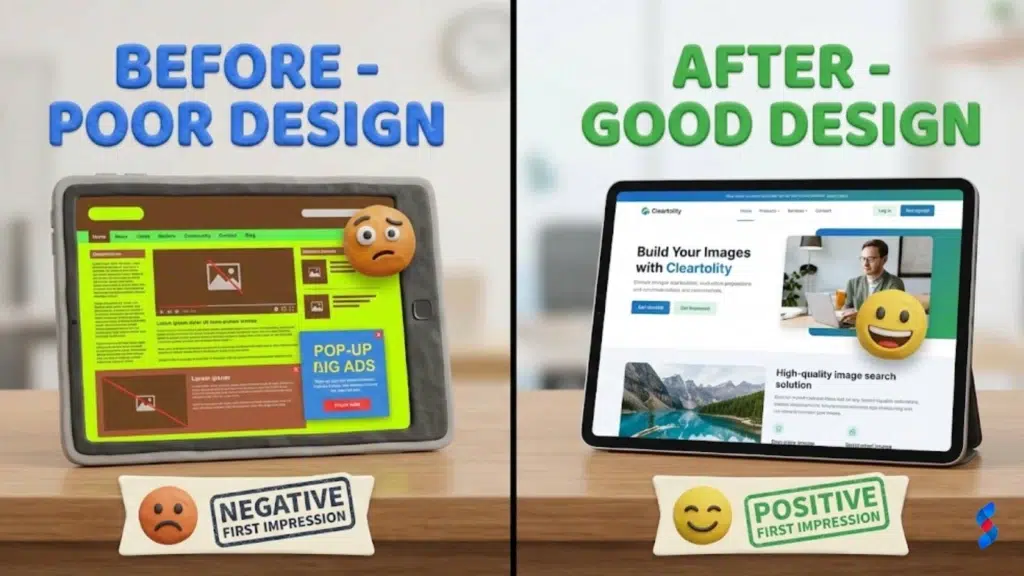
The first few seconds a visitor spends on your website are crucial. This is where they decide whether to stay or leave. Visually appealing designs, clear messaging, and intuitive navigation are essential for making a positive first impression. Poor web design, on the other hand, can lead to immediate abandonment. As they say, you only get one chance to make a first impression, and that holds true for your website as well.
Intuitive navigation is the backbone of good user experience (UX). Visitors should be able to easily find the information they need without frustration. Clear menus, logical site structure, and a prominent search bar are essential elements of effective navigation. In our experience working with clients in Dubai, we’ve seen firsthand how simplified navigation can significantly reduce bounce rates and increase time on site.
With the majority of internet users accessing websites on mobile devices, a mobile-first design approach is no longer optional. It’s a necessity. Mobile-first design prioritizes the mobile experience, ensuring that your website looks and functions flawlessly on smartphones and tablets. This not only improves user experience but also boosts your search engine ranking, as Google prioritizes mobile-friendly websites. Responsive design, which adapts the layout to fit different screen sizes, is a key component of mobile-first design.
Slow-loading websites are a major source of user frustration. Visitors expect websites to load quickly, and if your site takes too long, they’re likely to leave. Optimizing images, leveraging browser caching, and using a Content Delivery Network (CDN) can significantly improve website speed and performance. We’ve seen cases where simply optimizing image sizes has led to a noticeable improvement in user engagement.
Website accessibility means designing your website to be usable by people with disabilities, including visual, auditory, motor, and cognitive impairments. This includes providing alternative text for images, using sufficient color contrast, and ensuring keyboard navigation. Not only is website accessibility the right thing to do, but it also expands your potential audience and can even improve your search engine ranking. Addressing accessibility concerns often improves website usability for all users.
Clear and compelling calls to action (CTAs) are essential for guiding users towards desired actions, such as making a purchase, filling out a form, or contacting you. CTAs should be visually prominent, use action-oriented language, and be placed strategically throughout your website. A/B testing different CTA designs and placements can help you optimize your conversion rate. “Shop Now,” “Get a Free Quote,” and “Learn More” are all examples of effective CTAs.
Building trust is crucial for converting visitors into customers. Displaying trust signals, such as customer testimonials, security badges, and guarantees, can help build credibility and confidence. Highlighting positive reviews and showcasing awards and certifications can also reassure visitors that your business is trustworthy. In our experience, displaying a clear and concise privacy policy is another effective way to build trust.
Forms are often a key part of the conversion process, whether it’s a contact form, a registration form, or an order form. Optimizing forms for usability can significantly improve conversion rates. Keep forms short and simple, only asking for essential information. Use clear labels and instructions, and provide helpful error messages. Auto-filling fields and using progress indicators can also enhance the user experience.
A/B testing, also known as split testing, involves comparing two versions of a webpage or element to see which performs better. This is a powerful technique for optimizing your website for conversions. Test different headlines, images, CTAs, and layouts to see what resonates most with your audience. A/B testing allows you to make data-driven decisions, rather than relying on guesswork.
Your website is a reflection of your brand, and its design should be consistent with your brand identity. This includes using your brand colors, fonts, and logo consistently throughout your website. Visual consistency reinforces your brand message and helps create a cohesive brand experience. A consistent brand experience builds trust and recognition.
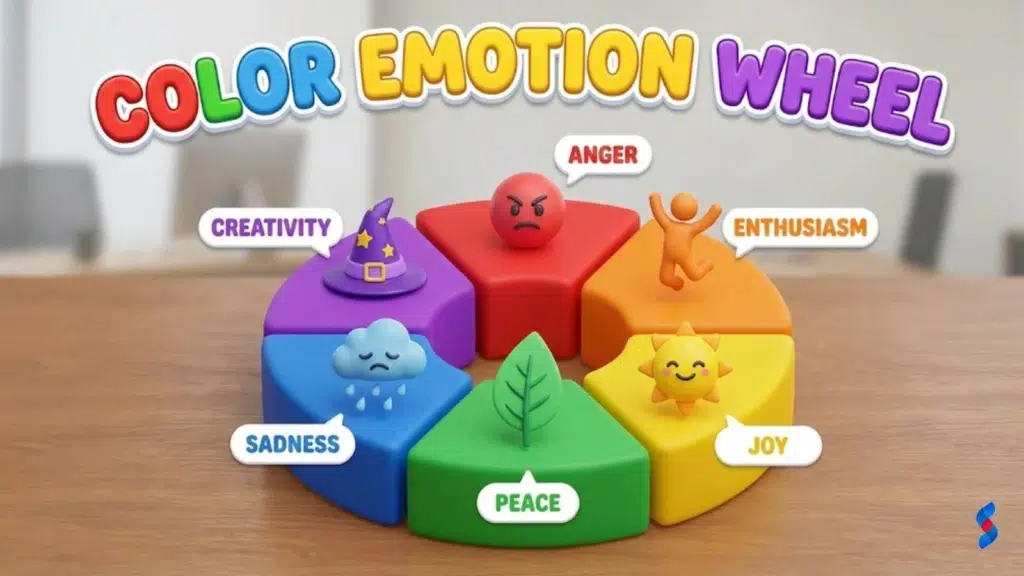
Colors evoke different emotions and associations, and choosing the right colors for your website can significantly impact how visitors perceive your brand. For example, blue is often associated with trust and stability, while green is associated with nature and health. Understanding color psychology can help you choose colors that align with your brand values and target audience.
Typography, or the art of choosing and using fonts, plays a crucial role in web design. Fonts can convey different moods and personalities, and choosing fonts that reflect your brand is essential. Use clear and readable fonts, and limit the number of fonts you use to maintain visual consistency. Pair fonts that complement each other to create a harmonious design.
Website traffic is a fundamental metric to track, providing insights into the overall visibility and reach of your website. Monitoring website traffic helps you understand how many people are visiting your site and where they are coming from. Tools like Google Analytics can provide detailed traffic reports, including the number of unique visitors, page views, and traffic sources. An increase in website traffic is generally a positive sign, indicating that your web design and marketing efforts are paying off.
Bounce rate measures the percentage of visitors who leave your website after viewing only one page. A high bounce rate can indicate that your website is not engaging or relevant to visitors. Analyzing your bounce rate can help you identify areas for improvement in your web design and content. For example, a high bounce rate on a specific page might suggest that the content is not meeting visitors’ expectations or that the page is difficult to navigate.
Conversion rate measures the percentage of visitors who complete a desired action on your website, such as making a purchase, filling out a form, or subscribing to a newsletter. Tracking your conversion rate is essential for understanding the effectiveness of your web design and marketing efforts. A low conversion rate might indicate that your website is not effectively guiding visitors towards desired actions or that there are usability issues that are hindering the conversion process. Conversion Rate Optimization (CRO) is a critical element of website performance.
Time on page measures the average amount of time that visitors spend on a particular page of your website. This metric provides insights into how engaging and informative your content is. A longer time on page suggests that visitors are finding your content valuable and are taking the time to read or watch it. Analyzing time on page can help you identify which content is resonating most with your audience and which content needs improvement.
Large image files can significantly slow down your website’s loading speed. Optimizing image sizes by compressing them without sacrificing quality can make a noticeable difference. Use image optimization tools to reduce file sizes and improve website performance. This is one of the easiest and most effective ways to improve user experience.
Poor readability can make it difficult for visitors to consume your content. Use clear and readable fonts, and ensure sufficient spacing between lines and paragraphs. Break up large blocks of text with headings, subheadings, and bullet points. Good readability improves user engagement and encourages visitors to spend more time on your site.
High-quality images and videos can significantly enhance user engagement. Use compelling visuals to break up text, illustrate concepts, and tell stories. Choose visuals that are relevant to your content and that resonate with your target audience. Visuals can help capture attention and keep visitors engaged.
Confusing navigation can frustrate visitors and lead to high bounce rates. Simplify your website’s navigation by using clear and concise menus, logical site structure, and a prominent search bar. Make it easy for visitors to find the information they need quickly and easily. Improved navigation enhances user experience and encourages visitors to explore your site.
In 2026, ignoring mobile users is a critical mistake. With the majority of internet traffic coming from mobile devices, your website must be fully responsive and optimized for mobile viewing. Failing to provide a seamless mobile experience can result in losing potential customers and damaging your brand reputation. Mobile-first design is essential for success in today’s digital landscape.
A cluttered layout can overwhelm visitors and make it difficult for them to find the information they need. Keep your website design clean and simple, with plenty of white space. Prioritize key content and avoid overwhelming visitors with too much information. A clean and uncluttered design improves user experience and enhances readability.
Slow loading times are a major source of user frustration. Visitors expect websites to load quickly, and if your site takes too long, they are likely to leave. Optimize your images, leverage browser caching, and use a Content Delivery Network (CDN) to improve website speed and performance. Fast loading times are crucial for retaining visitors and improving your search engine ranking.
Neglecting website accessibility excludes a significant portion of the population, including people with disabilities. Ensure that your website is usable by everyone by providing alternative text for images, using sufficient color contrast, and ensuring keyboard navigation. Website accessibility is not only the right thing to do, but it also expands your potential audience and can improve your search engine ranking.
Common Misconceptions
❌ Myth: “Web design is just about making a website look pretty.”
✅ Reality: While aesthetics are important, effective web design is also about functionality, usability, and achieving business goals. It’s a strategic blend of visual appeal and user experience (UX).
A local e-commerce business was struggling with low conversion rates due to an outdated and clunky website design. After a complete website redesign, focusing on improved user experience (UX), clear calls to action (CTAs), and mobile responsiveness, the company saw a 100% increase in conversions within just three months. The new design streamlined the purchasing process and made it easier for customers to find and buy products.
A software company redesigned its website with a focus on improving user experience (UX) and website usability. The redesign included simplified navigation, clear and concise content, and a mobile-first approach. As a result, customer satisfaction scores increased by 25%, and the company saw a significant reduction in support requests. The improved UX made it easier for customers to find the information they needed and resolve issues on their own.
A news website adopted a mobile-first design approach to cater to its growing mobile audience. The new design prioritized the mobile experience, with a clean and intuitive layout, fast loading times, and easy navigation. As a result, mobile engagement increased by 40%, and the website saw a significant increase in mobile ad revenue. The mobile-first approach allowed the website to reach a wider audience and provide a better user experience on mobile devices.
Artificial Intelligence (AI) is increasingly being used in web design to personalize user experiences, automate tasks, and improve website performance. AI-powered chatbots can provide instant customer support, while AI algorithms can analyze user behavior and optimize website layouts and content for better engagement. AI is transforming the way websites are designed and managed, enabling businesses to deliver more personalized and effective online experiences.
Virtual Reality (VR) and Augmented Reality (AR) are emerging technologies that are creating new opportunities for immersive and interactive web design. VR can create fully immersive virtual environments, while AR can overlay digital content onto the real world. These technologies are being used to create engaging product demos, virtual tours, and interactive gaming experiences. VR and AR are poised to revolutionize the way users interact with websites and online content.
Personalization is becoming increasingly important in web design, as users expect websites to cater to their individual needs and preferences. Websites are using data analytics and AI to personalize content, recommendations, and offers based on user behavior, demographics, and interests. Personalized user experiences can significantly improve engagement, conversion rates, and customer satisfaction.
> “Web design is not just about aesthetics; it’s about creating a seamless and intuitive user experience that drives results.” – Jakob Nielsen
Doing your own web design can be a cost-effective option, especially for small businesses with limited budgets. DIY website builders offer easy-to-use templates and drag-and-drop interfaces, allowing you to create a basic website without any coding knowledge. However, DIY web design also has its drawbacks. You may lack the expertise to create a truly professional and effective website, and you may struggle with more complex design and functionality requirements.
Hiring a professional web designer can provide you with the expertise and experience needed to create a high-quality website that meets your specific business goals. A professional web designer can help you with everything from website strategy and design to development and maintenance. While hiring a professional can be more expensive than doing it yourself, it can save you time and ensure that your website is effective and well-maintained.
Finding the right web designer for your needs requires careful research and evaluation. Look for a designer with a strong portfolio, relevant experience, and a good understanding of your industry. Ask for references and read online reviews to get a sense of the designer’s reputation and work ethic. Communicate your goals and expectations clearly, and ensure that the designer is a good fit for your budget and timeline.
| Factor | DIY Web Design | Professional Web Design |
|---|---|---|
| Cost | Lower initial cost | Higher initial cost |
| Expertise | Limited to your own skills | Expert knowledge and experience |
| Time | Time-consuming | Saves you time |
| Customization | Limited customization options | Highly customizable |
| Results | Basic website | Professional, effective website |
The web design impact on your business is undeniable. A well-designed website is a powerful tool for attracting customers, building brand awareness, and driving conversions. By investing in effective web design, you can create a positive online presence that sets you apart from the competition. Understanding the importance of user experience (UX), website usability, and brand identity is key to unlocking the full potential of your website.
Start by analyzing your current website and identifying areas for improvement. Focus on improving website usability, optimizing images for faster loading times, and ensuring mobile responsiveness. Consider A/B testing different elements to see what resonates most with your audience. By taking small, actionable steps, you can gradually improve your website and achieve significant results. Remember that conversion rate optimization (CRO) is an ongoing process.
We at SkySol Media are confident that by understanding and applying the principles outlined in this article, you can significantly improve your website’s performance and achieve your business goals.
Q: What is responsive web design?
A: Responsive web design is an approach to web design that makes web pages render well on a variety of devices and window or screen sizes from minimum to maximum display size to ensure website usability.
Q: How important is website speed?
A: Extremely important. Slow loading times frustrate users, increase bounce rates, and negatively impact your search engine ranking. Aim for a load time of under 3 seconds.
Q: What are the key elements of good UX design?
A: Key elements include intuitive navigation, clear and concise content, fast loading times, mobile responsiveness, and website accessibility.
Q: How does web design affect SEO?
A: Web design impacts SEO in several ways, including website speed, mobile-friendliness, website accessibility, and user experience (UX). A well-designed website is more likely to rank higher in search engine results.
Q: What is a call to action (CTA)?
A: A call to action (CTA) is a button or link that prompts users to take a specific action, such as making a purchase, filling out a form, or contacting you.

Why Small Businesses Should Prioritize Mobile-First Websites

The Future of WordPress Development in 2025

Web Development Meets Marketing: The SkySol Media Advantage

How to Make Your WordPress Site Lightning Fast in 2025-26

How Custom Plugin Development Can Solve Your Unique Business Problems

The Ultimate WordPress Speed Optimization Checklist for 2025-26