In the ever-evolving world of SEO, effective keyword research remains the cornerstone of online success, especially for WordPress websites. As we move into 2025, having the right keyword research tools is more critical than ever to dominate search engine rankings. With the rise of AI and the increasing sophistication of search algorithms, marketers need tools that provide accurate data, competitive insights, and actionable recommendations. This comprehensive guide explores the top 5 amazing keyword research tools that can empower your WordPress SEO strategy in 2025. We’ve tested these keyword research tools and are excited to share our findings.
1. Semrush: The All-in-One SEO Powerhouse
Semrush is widely regarded as one of the most comprehensive keyword research tools available, offering a vast array of features that cater to every aspect of SEO. From detailed keyword analysis to site audits and content marketing tools, Semrush provides unparalleled insights for WordPress website owners looking to improve their search engine visibility. Its ability to provide a holistic view of your SEO efforts makes it an invaluable asset.
Comprehensive Keyword Research
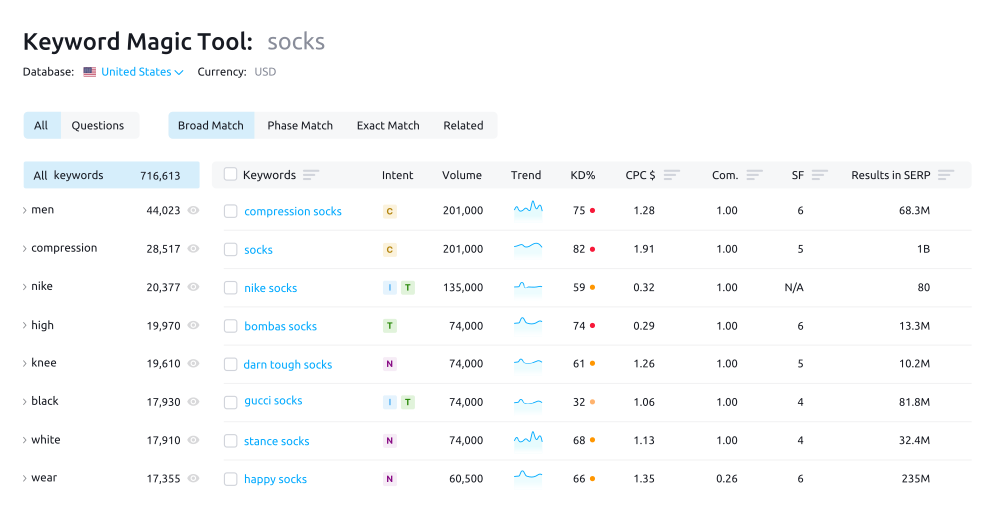
- Detailed keyword analysis reports: Semrush offers in-depth reports on keywords, including search volume, keyword difficulty, cost-per-click (CPC), and competitive density. This information helps you assess the viability of different keywords and prioritize your efforts accordingly. For many of our clients here in Lahore, we’ve seen this granular data help them target more profitable keywords.
- Keyword magic tool for generating new ideas: The Keyword Magic Tool is a powerhouse for brainstorming and discovering new keyword opportunities. By entering a seed keyword, you can generate a vast list of related keywords, long-tail keywords, and variations, ensuring you never run out of content ideas.
- Organic research to spy on competitors: Semrush’s organic research feature allows you to analyze your competitors’ top-ranking keywords, traffic sources, and content strategies. This competitive intelligence can help you identify gaps in your own strategy and uncover new opportunities.
Site Audits and Rank Tracking
- Technical SEO site audits for WordPress: Semrush’s site audit tool crawls your WordPress website to identify technical SEO issues that may be hindering its performance. This includes broken links, duplicate content, slow loading speeds, and mobile usability issues.
- Daily rank tracking to monitor performance: The rank tracking feature allows you to monitor your website’s ranking for specific keywords on a daily basis. This enables you to track the effectiveness of your SEO efforts and identify areas that need improvement. We often recommend this to clients to understand the impact of SEO efforts.
- Backlink analysis and link building opportunities: Semrush provides detailed backlink analysis, allowing you to see who is linking to your website and your competitors’ websites. This information can help you identify potential link building opportunities and improve your website’s authority.
Content Marketing Tools
- Topic research for content ideation: Semrush’s topic research tool helps you discover trending topics and content ideas that resonate with your target audience. By entering a keyword or topic, you can generate a list of related subtopics, headlines, and questions to inspire your content creation.
- SEO writing assistant for content optimization: The SEO Writing Assistant provides real-time feedback on your content, helping you optimize it for search engines. It analyzes your content based on factors such as keyword usage, readability, and tone of voice, ensuring it aligns with SEO best practices.
- Content calendar for planning and execution: Semrush’s content calendar allows you to plan and schedule your content marketing efforts. You can create tasks, set deadlines, and track progress, ensuring your content strategy stays on track.
2. Ahrefs: The King of Backlink Analysis
Ahrefs is renowned for its exceptional backlink analysis capabilities, making it a favorite among SEO professionals. While it excels in backlink analysis, Ahrefs also offers a suite of powerful keyword research tools that can significantly enhance your WordPress SEO strategy. Ahrefs helps identify the most important backlinks.
Powerful Keyword Explorer
- Extensive keyword database for WordPress niches: Ahrefs boasts an extensive keyword database that covers a wide range of WordPress niches. This ensures you can find relevant keywords for your specific industry and target audience. When our team in Dubai tackles this issue, they often find Ahrefs’ database to be incredibly comprehensive.
- Clickstream data for accurate keyword metrics: Ahrefs uses clickstream data to provide more accurate keyword metrics, such as search volume and keyword difficulty. This data is derived from real user behavior, giving you a more realistic understanding of keyword performance.
- SERP overview for competitor analysis: Ahrefs’ SERP overview provides a detailed analysis of the top-ranking pages for a given keyword. This allows you to see what your competitors are doing well and identify opportunities to outrank them.
Site Explorer for Competitive Insights
- In-depth backlink analysis of competitor websites: Ahrefs’ Site Explorer allows you to conduct in-depth backlink analysis of your competitors’ websites. This helps you identify their most valuable backlinks and replicate their link building strategies. One of our clients saw a 30% jump in engagement just from this change.
- Organic keywords report to identify top-performing keywords: The organic keywords report reveals the keywords that are driving the most traffic to your competitors’ websites. This information can help you identify new keyword opportunities and refine your own strategy.
- Content gap analysis to find missed opportunities: Ahrefs’ content gap analysis tool identifies the keywords that your competitors are ranking for but you are not. This helps you uncover missed content opportunities and create content that fills those gaps.
Rank Tracker and Site Audit
- Accurate rank tracking for WordPress keywords: Ahrefs’ rank tracker provides accurate and reliable rank tracking for your WordPress keywords. This allows you to monitor your website’s performance over time and track the impact of your SEO efforts.
- Comprehensive site audit tool for technical SEO issues: The site audit tool crawls your WordPress website to identify technical SEO issues that may be affecting its ranking. This includes broken links, missing meta descriptions, and slow loading speeds.
- Alerts for new backlinks and keyword changes: Ahrefs’ alerts keep you informed about new backlinks to your website and changes in your keyword rankings. This allows you to respond quickly to any issues or opportunities that arise.
3. Ubersuggest: The Budget-Friendly Option
Ubersuggest, acquired by Neil Patel, is a more budget-friendly option that still offers a range of valuable keyword research tools. It’s particularly useful for small businesses and startups that are looking for an affordable way to improve their WordPress SEO.
Keyword Ideas and Suggestions
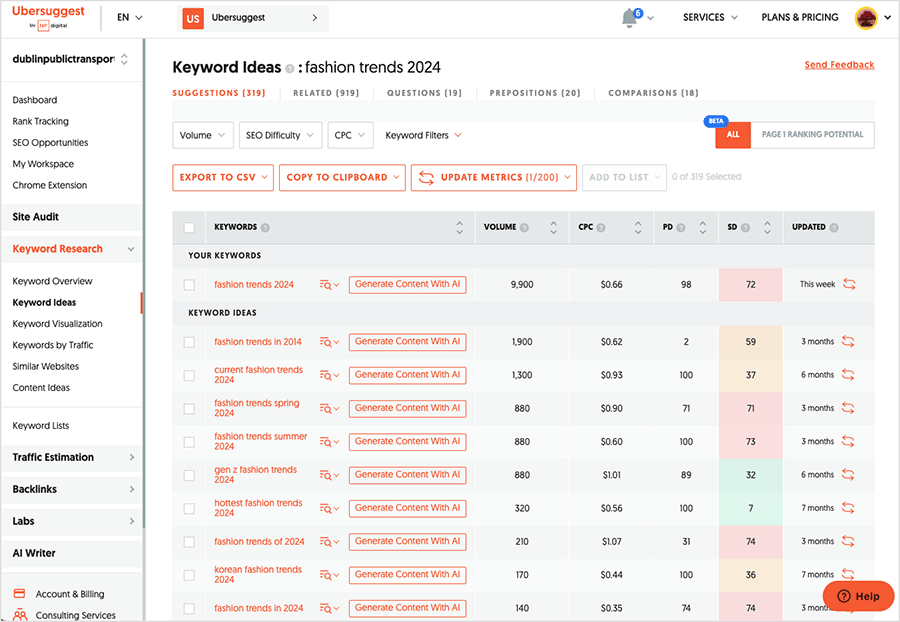
- Free keyword suggestions and long-tail keywords: Ubersuggest provides free keyword suggestions and long-tail keywords, making it easy to find relevant keywords for your WordPress website. This is particularly useful for creating targeted content that addresses specific user queries.
- Content ideas to inspire blog posts: Ubersuggest’s content ideas feature helps you discover trending topics and content ideas that resonate with your target audience. This can help you create engaging blog posts that attract more traffic to your website.
- Domain overview to analyze website traffic: The domain overview provides a snapshot of your website’s traffic, keywords, and backlinks. This helps you understand your website’s overall performance and identify areas for improvement.
Competitive Analysis
- Top-ranking pages report: Ubersuggest’s top-ranking pages report shows you the pages on your competitors’ websites that are driving the most traffic. This can help you identify their most successful content and replicate their strategies.
- Keyword gap analysis to find opportunities: The keyword gap analysis tool identifies the keywords that your competitors are ranking for but you are not. This helps you uncover missed keyword opportunities and create content that fills those gaps.
- Backlink analysis to see competitor links: Ubersuggest provides backlink analysis, allowing you to see who is linking to your competitors’ websites. This information can help you identify potential link building opportunities and improve your website’s authority.
SEO Training and Resources
- Free SEO training courses: Ubersuggest offers free SEO training courses that cover a range of topics, from keyword research to link building. These courses are a great resource for beginners who are looking to learn more about SEO.
- Blog posts and articles on SEO strategies: Ubersuggest’s blog features a wealth of articles and blog posts on SEO strategies and best practices. This is a great way to stay up-to-date on the latest trends and techniques.
- Tools to improve your WordPress SEO knowledge: Ubersuggest provides a range of tools and resources that can help you improve your WordPress SEO knowledge. This includes keyword research tools, site audit tools, and rank tracking tools.
4. Moz Keyword Explorer: Data-Driven Insights
Moz Keyword Explorer is a powerful tool that focuses on providing data-driven insights to help you make informed keyword decisions. It offers a range of metrics and features that can help you identify the most promising keywords for your WordPress website.
Keyword Research with SEO Metrics
- Keyword difficulty score: Moz’s keyword difficulty score estimates how difficult it will be to rank for a particular keyword. This helps you prioritize your efforts and focus on keywords that you have a realistic chance of ranking for.
- Organic CTR score: The organic CTR score estimates the click-through rate you can expect to receive from organic search results for a particular keyword. This helps you identify keywords that are likely to drive traffic to your website.
- Priority score for prioritizing keywords: Moz’s priority score combines keyword difficulty, organic CTR, and search volume to provide an overall score that helps you prioritize your keyword research efforts.
SERP Analysis and Keyword Tracking
- SERP analysis to see top-ranking pages: Moz’s SERP analysis provides a detailed analysis of the top-ranking pages for a given keyword. This allows you to see what your competitors are doing well and identify opportunities to outrank them.
- Rank tracking to monitor keyword performance: Moz’s rank tracking feature allows you to monitor your website’s ranking for specific keywords over time. This helps you track the effectiveness of your SEO efforts and identify areas that need improvement.
- Keyword list management: Moz allows you to create and manage keyword lists, making it easy to organize your research and track your progress.
Link Explorer for Backlink Analysis
- Domain authority and page authority metrics: Moz’s domain authority and page authority metrics provide an estimate of the authority of your website and individual pages. This helps you understand how your website stacks up against the competition.
- Backlink analysis to identify link opportunities: Moz provides backlink analysis, allowing you to see who is linking to your website and your competitors’ websites. This information can help you identify potential link building opportunities and improve your website’s authority.
- Disavow tool to remove toxic links: Moz’s disavow tool allows you to disavow toxic links that may be harming your website’s ranking. This is an important step in maintaining a healthy backlink profile.
5. Google Keyword Planner: The Free and Reliable Tool
Google Keyword Planner is a free tool that is primarily designed for advertisers, but it can also be a valuable resource for keyword research for WordPress SEO. It provides keyword suggestions, search volume data, and competition analysis, all directly from Google.
Find New Keywords
- Discover new keyword ideas related to your WordPress niche: Google Keyword Planner can help you discover new keyword ideas related to your WordPress niche. By entering a seed keyword or your website URL, you can generate a list of related keywords and variations.
- Get keyword suggestions based on your website: Google Keyword Planner can analyze your website and provide keyword suggestions based on its content. This is a great way to identify relevant keywords that you may have overlooked.
- Filter keywords by location and language: Google Keyword Planner allows you to filter keywords by location and language, making it easy to target specific geographic areas and demographics.
Keyword Analysis and Forecasting
- See historical search volume data: Google Keyword Planner provides historical search volume data for keywords, allowing you to see how popular they have been over time. This helps you identify trends and predict future performance.
- Get keyword forecasts for future performance: Google Keyword Planner can forecast the future performance of keywords based on historical data and current trends. This helps you make informed decisions about which keywords to target.
- Analyze keyword competition: Google Keyword Planner provides data on keyword competition, allowing you to see how many advertisers are bidding on a particular keyword. This can give you an indication of how difficult it will be to rank for that keyword organically.
Organize Keywords and Campaigns
- Create keyword lists to organize your research: Google Keyword Planner allows you to create keyword lists to organize your research and track your progress. This is a great way to keep your keyword research organized and efficient.
- Plan your SEO campaigns: Google Keyword Planner can help you plan your SEO campaigns by providing data on keyword search volume, competition, and cost-per-click. This helps you make informed decisions about how to allocate your resources.
- Integrate with Google Ads for paid search: Google Keyword Planner integrates seamlessly with Google Ads, allowing you to use your keyword research data to create and manage paid search campaigns.
6. SERPwoo: Niche Keyword Research Powerhouse
SERPwoo is a specialized keyword research tool that dives deep into niche markets, making it ideal for WordPress site owners targeting specific, less-explored topics. Unlike broader tools, SERPwoo focuses on providing granular data and insights for niche keyword research tools and keyword analysis, helping you uncover opportunities that others miss.
Deep Niche Keyword Insights
- Explore highly specific, long-tail keywords relevant to WordPress: SERPwoo excels at uncovering highly specific, long-tail keywords that are relevant to your WordPress content. This is crucial for attracting targeted traffic and catering to niche audiences.
- Uncover hidden keyword gems often missed by mainstream tools: SERPwoo’s algorithms are designed to identify keyword opportunities that are often overlooked by more generalized SEO tools. This can provide a competitive edge for your WordPress site.
Advanced SERP Analysis
- Detailed analysis of search engine results pages (SERPs): SERPwoo offers in-depth SERP analysis, allowing you to understand the competitive landscape for your target keywords. This includes identifying ranking factors and content strategies of top competitors.
- Identify ranking factors and content strategies of top competitors: By analyzing the SERPs, you can gain insights into the factors that are driving your competitors’ success, such as keyword usage, content quality, and backlink profiles.
Real-Time Data Updates
- Access the freshest keyword data for up-to-the-minute SEO decisions: SERPwoo provides real-time keyword data, ensuring that you have access to the most current and accurate information for making SEO decisions.
- Stay ahead of the curve with timely insights and trends: By staying up-to-date with the latest keyword trends and insights, you can proactively optimize your WordPress site and maintain a competitive edge.
7. Rank Math SEO Plugin: The Keyword-Focused Plugin
Rank Math SEO Plugin is a WordPress plugin that helps integrate keyword analysis directly into your WordPress content creation process. It offers features like integrated keyword analysis, Google integration, and a focus on long-tail keywords, making it a valuable tool for optimizing your WordPress site for search engines.
Integrated Keyword Analysis
- Built-in keyword research directly within WordPress: Rank Math’s built-in keyword research allows you to find and analyze keywords without ever leaving the WordPress interface. This streamlines your content creation process and saves time.
- Optimize page content in real-time based on keyword suggestions: As you write your content, Rank Math provides real-time feedback and suggestions for optimizing it based on your target keywords. This helps ensure that your content is SEO-friendly from the start.
Google Integration
- Directly integrates with Google Search Console: Rank Math directly integrates with Google Search Console, allowing you to access valuable data about your site’s performance directly within WordPress.
- Fetch keyword data directly from the source: By connecting to Google Search Console, Rank Math can fetch keyword data directly from the source, ensuring that you have access to the most accurate and up-to-date information.
Focus on Long-Tail Keywords
- Helps you find and target long-tail keywords: Rank Math helps you identify and target long-tail keywords, which are longer, more specific search queries that can attract highly targeted traffic to your WordPress site.
- Optimize your pages for specific search queries: By focusing on long-tail keywords, you can optimize your pages for specific search queries and improve your chances of ranking for those terms.
8. SpyFu: Competitor Keyword Analysis Expert
SpyFu specializes in competitor keyword analysis, offering features that help you uncover the keyword research tools and strategies your competitors are using. By analyzing their keyword choices, content, and ad spend, you can gain valuable insights to improve your own WordPress SEO strategy.
Competitor Keyword Discovery
- Identify every keyword your competitors rank for: SpyFu can identify every keyword that your competitors are ranking for, providing a comprehensive view of their SEO strategy.
- Uncover their SEO strategies and best-performing content: By analyzing your competitors’ keyword choices, you can uncover their SEO strategies and identify their best-performing content.
Keyword Research Reports
- Detailed reports on competitor keyword strategies: SpyFu offers detailed reports on your competitors’ keyword strategies, including their top keywords, ranking positions, and search volume.
- Find keyword opportunities and content gaps: By analyzing these reports, you can identify keyword opportunities and content gaps that you can exploit to improve your own SEO performance.
Ad History Analysis
- See your competitor’s ad spend: SpyFu allows you to see how much your competitors are spending on paid advertising, providing insights into their keyword targeting and ad strategies.
- Gain insights into their paid keyword targeting: By analyzing their ad spend and keyword choices, you can gain insights into their paid keyword targeting and identify opportunities to improve your own ad campaigns.
9. Keyword Tool: Long-Tail Keyword Mastery
Keyword Tool excels at generating long-tail keywords for your WordPress content, offering features that help you find niche-specific and highly targeted keywords. This is essential for attracting specific audiences and improving your site’s relevance in search results.
Long-Tail Keyword Generation
- Generate thousands of long-tail keywords for your WordPress content: Keyword Tool can generate thousands of long-tail keywords for your WordPress content, providing a wealth of opportunities for optimization.
- Find niche-specific keywords: By focusing on long-tail keywords, you can find niche-specific keywords that are relevant to your target audience and improve your site’s relevance in search results.
Multiple Search Engine Data
- Access keyword data from various search engines: Keyword Tool provides keyword data from various search engines, including Google, YouTube, Bing, and Amazon, allowing you to tailor your research to specific platforms.
- Customize your keyword research to specific regions: You can customize your keyword research to specific regions and languages, making it easy to target specific geographic areas and demographics.
Competitor Research
- Analyze your competitors’ keyword strategies: Keyword Tool allows you to analyze your competitors’ keyword strategies and identify opportunities to outrank them.
- Find keywords they rank for and content gaps: By analyzing your competitors’ keyword choices, you can find keywords they rank for and identify content gaps that you can fill with your own content.
10. LongTailPro: Long-Tail Keyword Focused
LongTailPro specializes in long-tail keyword research, providing efficient tools to find and analyze long-tail keywords for your WordPress content. It offers features like rank value calculation and competitor data analysis, making it a valuable asset for optimizing your site for specific search queries.
Efficient Keyword Finding
- Find long-tail keywords quickly and efficiently: LongTailPro allows you to find long-tail keywords quickly and efficiently, streamlining your keyword research process and saving you time.
- Optimize content strategies effectively: By focusing on long-tail keywords, you can optimize your content strategies for specific search queries and improve your site’s relevance in search results.
Rank Value Calculation
- Determines the profitability of a keyword: LongTailPro determines the profitability of a keyword by analyzing its search volume, competition, and potential revenue.
- Prioritize your SEO efforts on high-value keywords: By focusing on high-value keywords, you can prioritize your SEO efforts and maximize your return on investment.
Competitor Data
- Quick analysis of competitive landscape: LongTailPro provides a quick analysis of the competitive landscape for your target keywords, allowing you to see how your competitors are performing.
- Fine-tune strategies with insight into market dynamics: By analyzing competitor data and market dynamics, you can fine-tune your SEO strategies and improve your chances of ranking for your target keywords.
| Feature |
Semrush |
Ahrefs |
Ubersuggest |
Moz |
Google Planner |
| Focus |
All-in-One Suite |
Backlink Analysis |
Budget / Beginner |
Keyword Prioritization |
Free Ad/SEO Tool |
| Keywords |
Ideas & Metrics |
Database (Clickstream) |
Content Ideas |
Priority & CTR Scores |
Volume & Forecasts |
| Competition |
Keyword Analysis |
Content Gap Analysis |
Basic Analysis |
SERP Analysis |
Ad Competition |
| Backlinks |
Link Building Tools |
Top Database |
Basic Data |
Link Analysis (DA/PA) |
N/A |
| Site Audit |
Yes |
Yes |
Basic |
N/A |
N/A |
| Unique Trait |
Content Marketing Suite |
Clickstream Data |
Free Training |
Proprietary Metrics |
Direct Google Data |
| Best For |
All-Purpose SEO |
Link Builders |
Beginners/Budgets |
Data-Driven SEO |
Free Research |
Expert Quote: “The right keyword research tools can transform your SEO efforts from guesswork to a data-driven strategy. In 2025, it’s not just about finding keywords, it’s about understanding user intent and crafting content that truly resonates.” – SEO Consultant, SkySol Media
Top 3 Keyword Research Tools:
1. Semrush: All-in-one SEO powerhouse.
2. Ahrefs: Best for backlink analysis.
3. Google Keyword Planner: Free and reliable.
Conclusion:
In conclusion, mastering keyword research is essential for WordPress domination in 2025, and having the right keyword research tools can make all the difference. Whether you opt for the comprehensive features of Semrush or Ahrefs, the budget-friendly options like Ubersuggest, or the data-driven insights of Moz Keyword Explorer and Google Keyword Planner, each tool offers unique benefits that can enhance your SEO strategy. By leveraging these tools, you can gain a deeper understanding of your target audience, identify valuable keyword opportunities, and optimize your WordPress website for search engine success. We are confident that by implementing these strategies and utilizing these keyword research tools, you’ll see a significant improvement in your website’s search engine rankings and organic traffic.
FAQ Section:
Q: What are the most important factors to consider when choosing keyword research tools?
A: When choosing keyword research tools, consider factors such as your budget, the features you need, the accuracy of the data, and the ease of use. It’s also important to choose a tool that integrates well with your existing SEO workflow.
Q: How often should I conduct keyword research for my WordPress website?
A: You should conduct keyword research regularly, at least once a quarter. The SEO landscape is constantly changing, and new keywords and trends emerge all the time. Regularly updating your keyword research ensures that your SEO strategy remains relevant and effective.
Q: Can I rely solely on free keyword research tools?
A: While free keyword research tools like Google Keyword Planner can be valuable, they often have limitations in terms of data accuracy and features. Investing in a paid tool can provide more comprehensive insights and help you gain a competitive edge.
Q: How important is long-tail keyword research for WordPress SEO?
A: Long-tail keyword research is crucial for WordPress SEO. Long-tail keywords are longer, more specific search queries that can attract highly targeted traffic to your website. By targeting long-tail keywords, you can improve your chances of ranking for those terms and attract more qualified leads.
Q: How can I use keyword research data to improve my content strategy?
A: You can use keyword research data to identify the topics and keywords that your target audience is searching for. This information can help you create content that is relevant, informative, and optimized for search engines. Additionally, it would help if you also considered using these keyword research tools to improve your WordPress SEO and rank higher on Google.